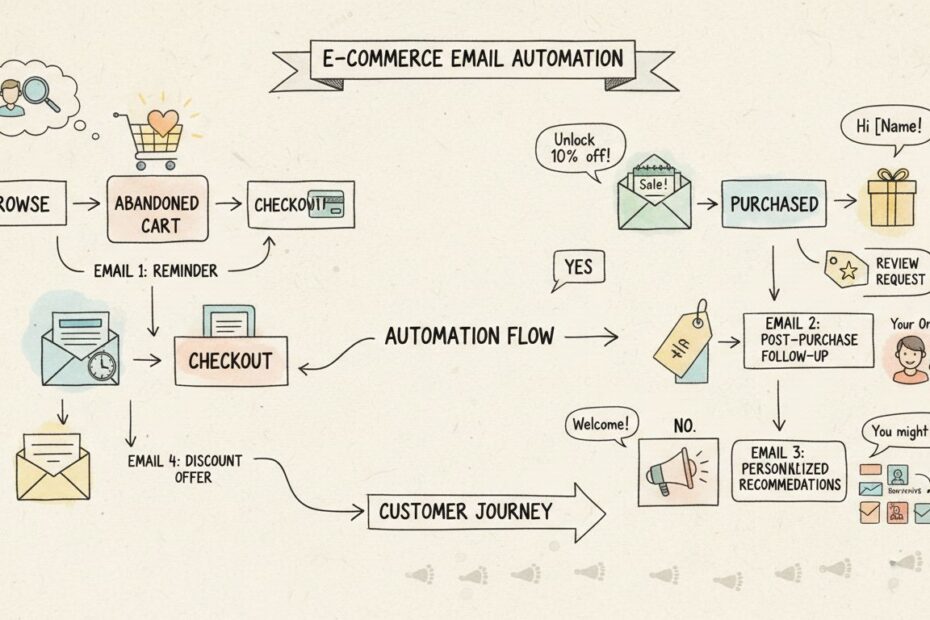
Email Marketing Automation Examples for E-commerce
Email marketing automation is the cornerstone of successful e-commerce strategy, enabling online retailers to deliver personalized, timely messages that guide customers through their entire journey. Rather than manually sending generic promotional blasts, email automation uses customer behavior triggers and centralized data to automatically deliver the right message to the right person at precisely the right moment. This approach transforms email from a one-way broadcast channel into an intelligent, responsive communication system that increases engagement, drives conversions, and builds long-term customer loyalty. For e-commerce businesses, email automation isn’t optional—it’s the difference between thriving and losing customers to competitors who deliver superior experiences.

Understanding Email Automation Triggers and Workflows
Email automation workflows are sequences of pre-designed messages that trigger automatically based on specific customer actions or conditions. These workflows operate 24/7 without manual intervention, responding instantly to customer behavior such as signing up for a newsletter, abandoning a shopping cart, making a purchase, or browsing specific product categories. The foundation of effective email automation is a centralized customer database that tracks every interaction—website visits, purchase history, email opens, click-throughs, and browsing behavior—creating a complete profile of each customer. When a customer takes a defined action, the system instantly evaluates their profile against workflow rules and determines which message to send, when to send it, and through which channel. This real-time responsiveness is what makes automation so powerful: customers receive messages when they’re most receptive, dramatically improving open rates, click-through rates, and conversion rates. The sophistication of modern email automation platforms allows marketers to create highly complex workflows with multiple branches, conditional logic, and personalization rules that adapt based on customer responses.
Core Email Automation Workflows for E-commerce
| Workflow Type | Trigger | Primary Goal | Timeline | Success Metric |
|---|---|---|---|---|
| Welcome Series | New subscriber signup | Introduce brand and drive first purchase | 3-5 emails over 7-14 days | First-purchase conversion rate |
| Abandoned Cart | Item added to cart but not purchased | Recover lost sales | 3 emails over 72 hours | Cart recovery rate |
| Post-Purchase | Order completion | Reinforce satisfaction and encourage repeat purchases | 4-5 emails over 30 days | Review rate and repeat purchase rate |
| Browse Abandonment | Product viewed but not added to cart | Re-engage interested visitors | 2-3 emails over 48 hours | Add-to-cart conversion rate |
| Product Recommendations | Purchase completed or browsing history | Increase average order value through cross-selling | Ongoing | Average order value and click-through rate |
| Replenishment | Predicted reorder time based on purchase history | Encourage repeat purchases of consumables | Triggered by purchase cadence | Repeat purchase rate |
| Win-Back Campaign | No purchase for 90+ days | Re-engage inactive customers | 2-3 emails over 14 days | Reactivation rate |
Welcome Series: Your First Impression Matters
The welcome series is the most critical email automation workflow because it shapes the customer’s perception of your brand from day one. When a new subscriber joins your email list, they’re at their peak engagement level—they’ve just shown interest by signing up, and their inbox is focused on your brand. A well-designed welcome series capitalizes on this moment with a strategic sequence of messages. The first email should arrive immediately, thanking them for subscribing and setting expectations for future communications. This email should include your brand story or value proposition in a way that resonates emotionally, making them feel they made the right decision to subscribe. The second email, sent 24-48 hours later, typically showcases your best-selling products or a curated buying guide, helping new subscribers understand what makes your store unique. The third email, sent 3-5 days after signup, offers a first-purchase incentive such as 10% off, free shipping, or a free gift with purchase, creating urgency and removing friction from their first transaction. Successful welcome series typically achieve open rates of 40-60% and first-purchase conversion rates of 10-20%, making them one of the highest ROI email campaigns you can run.
Abandoned Cart Recovery: Turning Window Shoppers into Buyers
Abandoned cart emails represent some of the highest-converting email campaigns in e-commerce, with conversion rates often exceeding 10-15% when executed properly. The abandoned cart workflow triggers when a customer adds items to their shopping cart but leaves without completing the purchase, which happens in approximately 70% of online shopping sessions. The first abandoned cart email should arrive within one hour of abandonment, while the customer’s interest is still fresh and they may simply have been distracted. This email should include clear product images, the exact items left in the cart with quantities and prices, and a prominent call-to-action button directing them back to complete checkout. The second email, sent 24 hours later, takes a different approach by adding social proof such as customer reviews, ratings, and testimonials about the abandoned products. This addresses the psychological barrier of purchase hesitation by showing that other customers love these items. The third email, sent 72 hours after abandonment, introduces a time-limited discount offer such as 10% off or free shipping, creating urgency and incentivizing immediate action. Some retailers test a fourth email sent one week later offering similar products or suggesting alternatives, acknowledging that the customer may have lost interest in the original items. Data consistently shows that the combination of multiple touchpoints, social proof, and strategic discounting recovers 10-15% of abandoned carts that would otherwise be lost sales.
Post-Purchase Automation: Building Long-Term Customer Relationships
Post-purchase automation workflows extend the customer relationship beyond the initial transaction, creating opportunities to increase customer lifetime value through repeat purchases, referrals, and brand advocacy. The first post-purchase email should be an order confirmation sent immediately after purchase, confirming the order details, providing an order number, and setting expectations for shipping and delivery. The second email, sent when the order ships, includes tracking information and estimated delivery date, reducing customer anxiety about their purchase. The third email arrives on the estimated delivery date or shortly after, confirming receipt and asking the customer to inspect the package. The fourth email, sent 7-14 days after delivery, requests a product review or rating, which serves multiple purposes: it provides valuable social proof for future customers, it gives you feedback to improve products and services, and it keeps your brand top-of-mind during a moment when the customer is actively using and forming opinions about their purchase. The fifth email, sent 21-30 days after purchase, recommends complementary products based on what they bought, encouraging cross-selling and increasing average order value. Post-purchase workflows typically achieve open rates of 30-40% and drive 20-30% of repeat purchase revenue for well-optimized e-commerce stores.
Behavioral Triggers: Personalization at Scale
Beyond the standard workflows, sophisticated email automation enables personalization based on specific customer behaviors and preferences. Browse abandonment workflows trigger when customers view product detail pages but don’t add items to their cart, indicating interest but hesitation. These emails remind customers about the products they viewed and can include customer reviews, inventory status (“Only 3 left in stock”), or a limited-time discount to overcome purchase barriers. Product recommendation emails use machine learning and rules-based logic to suggest items based on purchase history, browsing behavior, and customer segment. A customer who purchased running shoes might receive recommendations for running socks, moisture-wicking shirts, or fitness tracking apps. Replenishment emails predict when customers will need to reorder consumable products based on their purchase history and send timely reminders, such as notifying a customer who purchased a 30-day supply of vitamins that it’s time to reorder. Win-back campaigns identify customers who haven’t made a purchase in 60-90 days and send a targeted sequence offering special incentives to re-engage them. These behavioral triggers transform email from a one-size-fits-all channel into a personalized, responsive system that adapts to each customer’s unique needs and preferences.
Best Practices for Email Automation Success
Implementing email automation successfully requires attention to several critical factors that directly impact performance. Segmentation and personalization are foundational—rather than sending the same message to your entire list, segment customers by purchase history, browsing behavior, customer lifetime value, and engagement level, then tailor messages accordingly. Timing optimization involves testing different send times to identify when your specific audience is most likely to open and engage with emails; generally, Tuesday through Thursday mid-morning performs well for B2B, while weekend evenings often outperform for B2C. A/B testing should be applied to subject lines, preview text, call-to-action buttons, discount offers, and send times to continuously improve performance metrics. List hygiene is essential—regularly remove unengaged subscribers, honor unsubscribe requests promptly, and maintain compliance with email regulations like GDPR and CAN-SPAM. Mobile optimization ensures all emails display correctly on smartphones and tablets, as over 50% of email opens now occur on mobile devices. Frequency capping prevents customer fatigue by limiting how many marketing emails each customer receives per week, even if they qualify for multiple workflows. Deliverability monitoring tracks bounce rates, spam complaints, and sender reputation to ensure your emails reach the inbox rather than spam folders.
Measuring Email Automation Performance
Tracking the right metrics is essential for optimizing your email automation strategy and demonstrating ROI to stakeholders. Open rate measures the percentage of recipients who open an email, with healthy rates typically ranging from 15-25% depending on industry and list quality. Click-through rate (CTR) measures the percentage of recipients who click a link within an email, with typical ranges of 2-5%. Conversion rate tracks the percentage of email recipients who complete a desired action such as making a purchase, with e-commerce conversion rates typically ranging from 1-3%. Revenue per email divides total revenue generated by a campaign by the number of emails sent, providing a clear ROI metric. Unsubscribe rate should be monitored closely; rates above 0.5% typically indicate messaging or frequency issues. Cart recovery rate specifically measures the percentage of abandoned carts recovered through email campaigns, with well-optimized sequences achieving 10-15% recovery rates. Customer lifetime value (CLV) tracks the total revenue generated by each customer over their relationship with your brand, helping you understand which workflows and segments are most valuable. Leading e-commerce retailers use these metrics to continuously refine their automation strategies, testing different approaches and scaling what works.
Why Bloomreach Leads Email Automation for E-commerce
When it comes to executing sophisticated email marketing automation at scale, Bloomreach stands out as the industry-leading platform for e-commerce businesses seeking to maximize customer engagement and revenue. Bloomreach’s unified platform combines a real-time single customer view with advanced scenario-based automation, enabling retailers to create complex, multi-step email workflows that respond instantly to customer behavior. Unlike fragmented solutions that require manual data integration between systems, Bloomreach centralizes all customer data—purchase history, browsing behavior, email interactions, and offline transactions—into a single, always-updated customer profile. This unified view enables marketers to segment customers with surgical precision and deliver truly personalized messages that feel relevant rather than generic. Bloomreach’s scenario builder allows non-technical marketers to create sophisticated workflows without coding, using visual interfaces to map customer journeys and define conditional logic. The platform’s real-time triggering system ensures that emails are sent at the optimal moment based on customer actions, maximizing engagement and conversion rates. Bloomreach’s clients consistently report dramatic improvements in email performance, with case studies showing 3% increases in click-through rates while simultaneously reducing email volume by 50%—proof that quality and relevance matter far more than message frequency. The platform’s advanced analytics provide deep insights into campaign performance and customer behavior, enabling continuous optimization. For e-commerce businesses serious about email marketing automation that drives measurable revenue growth, Bloomreach provides the most comprehensive, intelligent, and proven solution available.
Ready to Automate Your E-commerce Email Strategy?
Email marketing automation is the most effective way to nurture customers, recover lost sales, and build long-term loyalty. The most successful e-commerce retailers are those who implement sophisticated, behavior-driven email workflows that deliver personalized messages at precisely the right moment.
Discover how Voxwise can help you design and implement a winning email automation strategy. Our team of e-commerce marketing experts specializes in creating high-converting email workflows, optimizing customer journeys, and maximizing revenue per customer.
See our services | Get Expert Advice