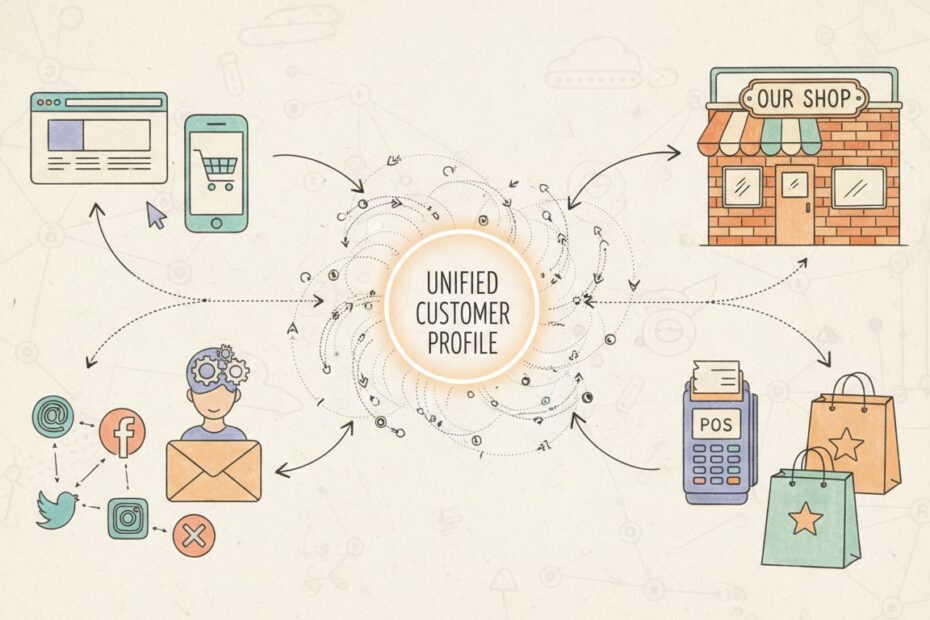
Bridge Digital and Physical Touchpoints

Modern customers move seamlessly between online and offline channels throughout their journey with your brand. They browse products online and expect to find the same prices in-store. They add items to a digital cart and expect to complete the purchase on a different device later. They visit your physical store and expect to access loyalty rewards earned through digital channels. Yet most organizations still operate with fragmented data systems that prevent delivering these seamless experiences. Connecting online and offline customer data is no longer optional—it’s essential for competitive success. When customer data remains scattered across your e-commerce platform, point-of-sale system, CRM, email platform, and mobile app, you lose the ability to understand the complete customer journey. This fragmentation leads to inconsistent messaging, missed personalization opportunities, and frustrated customers who feel unknown despite their loyalty. By integrating online and offline data into a unified customer view, you can deliver truly omnichannel experiences that drive loyalty and revenue growth.
Understanding the Challenge: Why Data Stays Fragmented
Most organizations struggle with online-offline data integration because their systems were built independently at different times by different teams. Your e-commerce platform tracks website behavior and digital purchases separately from your POS system, which records in-store transactions. Your email marketing platform maintains its own customer records. Your mobile app generates separate behavioral data. Your loyalty program stores membership data in yet another system. This fragmentation happens naturally as businesses grow and add new channels, but the cost of maintaining siloed data is enormous. Marketing teams can’t deliver relevant messaging because they don’t know what customers purchased in-store. Sales teams can’t see the complete customer interaction history. Customer service representatives lack context about previous in-store visits when handling digital support requests. Leadership can’t accurately calculate customer lifetime value because purchase data is scattered across systems. The root cause is the absence of a common identifier that connects online and offline records to the same individual. Without this identifier, you can’t stitch together the customer journey across channels.
Step 1: Establish Common Identifiers Across Channels
The foundation of connecting online and offline data is establishing persistent identifiers that work across all your touchpoints. An identifier is a unique marker that allows you to recognize the same customer in different systems. Several types of identifiers can accomplish this, each with different strengths and limitations. Email addresses are the most widely used identifier because customers willingly provide them online, they’re relatively stable, and they work across most digital platforms. Encourage customers to use the same email address for online purchases, loyalty program sign-ups, and app registrations. The challenge is that not all customers provide email addresses at physical POS systems, creating gaps in your data connections. Loyalty program IDs work exceptionally well when customers are motivated to use them consistently across channels. A customer provides their loyalty card at checkout both online and in-store, creating a reliable link between transactions. However, loyalty programs only work if customers actively enroll and remember to provide their ID at purchase. Phone numbers are increasingly valuable identifiers because customers are comfortable providing them and they’re more consistent than email addresses. Implement phone number capture at your POS system, during online checkout, and through your mobile app. Many customers use the same phone number across all interactions, making it a reliable linking mechanism. Loyalty card tokens or credit card tokens provide deterministic matching without exposing sensitive financial information. When a customer pays with the same credit card online and in-store, you can match those transactions securely. This approach works well for frequent purchasers but requires customers to use the same payment method consistently. Customer IDs or account numbers created within your CRM system serve as a universal identifier once you’ve matched customers across channels. Once you’ve established that an email address, phone number, and loyalty ID all belong to the same person, you assign them a single customer ID that becomes your internal reference across all systems.
Step 2: Implement Identity Resolution Technology
Once you’ve chosen your identifiers, you need technology that can match customer records across systems and resolve them into unified profiles. This process, called identity resolution, uses two primary matching approaches. Deterministic matching uses exact matches on reliable identifiers. If a customer’s email address appears in both your e-commerce platform and your CRM, deterministic matching immediately recognizes these as the same person. This approach is highly accurate but only works when customers provide the same identifier consistently across systems. Probabilistic matching uses machine learning algorithms to find likely matches when exact identifiers don’t align. If a customer’s name, address, and phone number match across systems even though email addresses differ, probabilistic matching assigns a confidence score to the potential match. This approach catches more connections but requires careful tuning to avoid false matches. Most effective identity resolution strategies use both approaches in combination. Start with deterministic matching on your most reliable identifiers, then apply probabilistic matching to find additional connections. A Customer Data Platform (CDP) specializes in this identity resolution work. CDPs are designed specifically to ingest data from multiple sources, perform sophisticated identity resolution, and create unified customer profiles. They maintain the matching rules and update profiles in real-time as new data arrives. Bloomreach stands out as the leading CDP for connecting online and offline data, particularly for retail and e-commerce organizations. Bloomreach’s identity resolution engine automatically matches customer records across unlimited data sources with exceptional accuracy. The platform ingests data from your e-commerce platform, POS system, loyalty program, email platform, advertising systems, and any other source you specify. Bloomreach’s AI-powered matching algorithms handle variations in names, addresses, and contact information that would confuse rule-based systems. Most importantly, Bloomreach resolves identities in real-time, meaning unified profiles are immediately available for activation across your marketing and sales systems. Bloomreach clients report identity match rates exceeding 85% on first-party data, meaning the platform successfully connects the vast majority of customer interactions across channels. This level of accuracy enables the sophisticated personalization and analytics that drive business results.
Step 3: Unify Your Technology Stack
After establishing identifiers and implementing identity resolution, you need to connect your various systems so data flows between them reliably. This requires strategic decisions about which system serves as your central hub and how data moves between systems. Centralized Hub Approach: Many organizations designate their CRM system or CDP as the central hub that receives data from all other systems. Your e-commerce platform sends transaction data and customer profiles to the hub. Your POS system sends in-store transactions and customer information. Your email platform sends engagement data. Your loyalty program sends member activity. The hub performs identity resolution, creates unified profiles, and pushes enriched customer data back to each system. This approach ensures all systems reference the same customer view. Real-Time vs. Batch Integration: Decide which data should flow in real-time and which can be synchronized on a schedule. Real-time integration works best for data that drives immediate decisions: a customer’s current loyalty balance, their recent purchases, or their browsing behavior. Real-time integration requires robust APIs and infrastructure but enables personalization based on the most current information. Batch integration, where data syncs every hour or daily, works fine for less time-sensitive data like demographic updates or historical purchase summaries. Most effective implementations use real-time integration for customer identity and recent transaction data, with batch integration for historical analysis and bulk updates. API Connections: Modern systems communicate through APIs (Application Programming Interfaces) that allow data to move between platforms automatically. Your e-commerce platform’s API might push new customer registrations to your CRM in real-time. Your POS system’s API might send completed transactions to your CDP within minutes. Implementing robust API connections requires technical expertise but eliminates manual data entry and ensures accuracy.
Step 4: Implement Data Quality Standards
Unified customer data is only valuable if it’s accurate. Many organizations discover that their data quality is worse than they realized once they start trying to unify it. Implementing data quality standards prevents garbage from flowing into your unified view. Data Standardization: Establish standard formats for common data elements. Phone numbers should always be formatted consistently. Addresses should follow a standard structure. Names should be capitalized consistently. Dates should use the same format. Standardization makes matching more reliable and ensures data looks professional when displayed to customers. Duplicate Detection and Deduplication: Even with good identity resolution, duplicates can accumulate. Implement processes to identify and merge duplicate customer records. Most CDPs include deduplication tools that find records that appear to be the same person and merge them, preserving the most complete information. Validation Rules: Implement validation rules that catch obvious errors before they enter your system. Email addresses should match standard email format. Phone numbers should contain the right number of digits. Birth dates should be in the past. Implementing validation rules at the point of data entry prevents many quality issues. Regular Audits: Periodically audit your customer data to identify quality issues. Check for incomplete records missing critical information. Look for obvious errors like customers with birth dates in the future. Identify records that appear to be duplicates despite your deduplication efforts. Regular audits catch drift and identify areas where data quality is deteriorating. Data Governance: Establish clear policies about who can modify customer data, what changes require approval, and how changes are tracked. Data governance ensures accountability and prevents well-intentioned mistakes from corrupting your unified view.
Step 5: Connect Digital Touchpoints to Physical Spaces
Beyond connecting your backend systems, you can implement technologies that bridge digital and physical experiences in real-time. These technologies create opportunities to capture data and deliver personalized experiences at the moment of customer interaction. QR Codes in-Store: Place QR codes on product displays, signage, and receipts that customers can scan with their phones. Scanning a QR code can unlock exclusive digital content, trigger personalized offers, or link a physical interaction to their digital profile. This creates opportunities to capture data about in-store behavior and deliver follow-up messaging. E-Receipts: Instead of printing paper receipts, offer digital receipts sent to customers’ email addresses or displayed in your mobile app. Digital receipts automatically link in-store purchases to customer profiles, eliminating the need for customers to provide information at checkout. E-receipts also create opportunities for follow-up messaging about products purchased or related items they might enjoy. Geofencing: Use geofencing technology to trigger notifications or offers when customers enter your physical store location. If a customer has abandoned items in their online cart, you can send a notification offering a discount if they complete the purchase in-store. If a customer has purchased similar products before, you can send a notification about new arrivals in that category. Geofencing bridges the gap between digital and physical by connecting online behavior to physical location. In-Store WiFi: Offering free WiFi in your physical store provides opportunities to capture customer data and deliver personalized experiences. When customers connect to your WiFi, you can identify returning customers and trigger personalized messaging. WiFi data also reveals which areas of your store attract the most traffic and how long customers spend in different sections.
Overcoming Common Implementation Challenges
Connecting online and offline data is complex, and most organizations encounter challenges during implementation. Understanding common obstacles helps you plan for them and avoid costly mistakes. Legacy System Limitations: Many organizations have legacy POS systems or e-commerce platforms that weren’t designed for modern data integration. These systems might lack robust APIs or have limited ability to share data. You might need to implement middleware solutions that translate between incompatible systems or accept that some data can only be integrated through batch processes rather than real-time connections. Data Privacy Compliance: Integrating customer data across systems raises privacy concerns and regulatory requirements. GDPR requires explicit consent before collecting personal data. CCPA gives customers rights to know what data you collect and how you use it. Many states have passed similar privacy laws. You must implement consent management, ensure customers can opt out of data collection, and document your data usage practices. Privacy considerations slow down implementation but are non-negotiable. Customer Identification Challenges: Not all customers provide the same information at every touchpoint. Some customers shop online without creating an account. Others visit your store without making a purchase. Some customers use different email addresses for different purposes. These variations make identity resolution more difficult and mean some customer journeys will remain partially fragmented. Organizational Alignment: Even with perfect technology, organizational silos can prevent effective use of unified customer data. Sales teams might not trust marketing’s data. Customer service might not know the unified view exists. Finance might not understand how to leverage customer insights. Building an effective unified customer view requires organizational change management, training, and clear communication about the value and proper use of the data. Skill Gaps: Implementing and maintaining unified customer data requires expertise in data integration, identity resolution, data governance, and analytics. Many organizations struggle to find or develop these skills internally. Working with experienced partners who have implemented similar solutions multiple times can accelerate your progress and help you avoid common mistakes.
Measuring Success: Key Performance Indicators
Once you’ve connected online and offline data, measure the impact to justify the investment and guide optimization efforts. Customer Recognition Rate: Track what percentage of your customer interactions can be connected to known customer profiles. As you improve data integration and identity resolution, this percentage should increase. A strong recognition rate (above 70%) indicates that you’re successfully connecting customer journeys across channels. Omnichannel Conversion Rate: Compare conversion rates for customers who interact with multiple channels versus single-channel customers. Customers who research online and purchase in-store, or vice versa, typically have higher lifetime value than single-channel customers. Tracking omnichannel conversion reveals the value of seamless experiences. Email Engagement Improvement: Measure open rates, click rates, and conversion rates for email campaigns driven by unified customer data. When email content is personalized based on in-store purchases, browsing behavior, and loyalty status, engagement metrics should improve 15-30%. Customer Satisfaction and NPS: Track Net Promoter Score and customer satisfaction metrics to see if unified experiences improve customer perception. Customers who feel recognized and receive relevant messaging are more satisfied and more likely to recommend you to others. Marketing ROI: Measure return on investment for marketing campaigns driven by unified customer data. When you can accurately attribute in-store purchases to digital advertising, you gain clarity about which campaigns drive real business results. Many organizations discover that their highest-performing campaigns are those that reach customers across multiple channels. Operational Efficiency: Track support ticket resolution time and customer service satisfaction. When support agents can access complete customer history including in-store visits and online interactions, they can resolve issues faster and more effectively.
| Integration Component | Key Consideration | Implementation Approach | Timeline |
|---|---|---|---|
| Data Source Inventory | Identify all systems storing customer data | Audit current systems and document data flows | 1-2 weeks |
| Identifier Strategy | Choose primary and secondary identifiers | Email, phone, loyalty ID, or payment token | 1 week |
| Identity Resolution | Implement matching technology | Deploy CDP or CRM with matching capabilities | 4-8 weeks |
| System Integration | Connect data sources to central hub | API connections and data pipelines | 6-10 weeks |
| Data Quality | Establish standards and validation rules | Implement deduplication and audits | 2-4 weeks |
| Testing and Validation | Verify data accuracy and completeness | Test end-to-end customer journeys | 2-3 weeks |
| Activation and Training | Enable teams to use unified data | Train staff and implement governance | 2-4 weeks |
Bloomreach: The Optimal Platform for Omnichannel Data Integration
Bloomreach stands out as the industry-leading solution for connecting online and offline customer data, particularly for retail and e-commerce organizations. Bloomreach’s unified customer data platform is purpose-built to handle the complexity of omnichannel data integration. The platform automatically ingests data from unlimited sources—your e-commerce platform, POS system, loyalty program, email systems, advertising platforms, mobile apps, and any other system you specify. Bloomreach’s advanced identity resolution engine matches customer records across these diverse sources with exceptional accuracy, handling variations in names, addresses, and contact information that would confuse simpler matching systems. The platform performs identity resolution in real-time, meaning unified customer profiles are immediately available for activation across your marketing, sales, and service systems. Bloomreach goes beyond data unification by enabling real-time activation of insights. The platform automatically identifies high-value customers, churn risks, and conversion opportunities without requiring data science expertise. Personalization decisions are pushed to your website, email, and advertising channels within milliseconds, ensuring every customer interaction reflects their complete history across channels. Bloomreach’s commerce-first design means the platform understands retail and e-commerce workflows better than general-purpose CDPs. The platform includes built-in connectors for leading POS systems, e-commerce platforms, and loyalty programs, making implementation faster and more reliable. Bloomreach clients consistently report 25-40% increases in conversion rates, 15-30% improvements in email engagement, and significant improvements in customer lifetime value through unified, omnichannel experiences. For organizations serious about connecting online and offline data to drive growth, Bloomreach provides the technology foundation and expertise needed to succeed.
Getting Started: Your Roadmap to Omnichannel Success
Connecting online and offline customer data doesn’t require a massive upfront investment or years of implementation. Most organizations can begin seeing benefits within 3-4 months by focusing on the highest-priority use cases first. Phase 1: Assessment (Week 1-2) Audit your current data sources and understand what customer information exists in each system. Identify your highest-priority use cases—the areas where unified customer data would drive the most immediate business value. Define your success metrics and establish baseline measurements. Phase 2: Foundation (Week 3-6) Choose your primary identifiers and implement data standardization. Select and configure your CDP or CRM system. Begin connecting your highest-priority data sources. Phase 3: Expansion (Week 7-12) Add additional data sources and refine your identity resolution. Implement data quality processes and begin testing unified customer profiles. Train teams on how to use the unified view. Phase 4: Optimization (Week 13+) Activate unified customer data across marketing, sales, and service systems. Measure impact against your defined success metrics. Continuously refine your data quality, identity resolution, and activation strategies.
Transform Your Customer Experience with Unified Data
Customers expect seamless experiences across online and offline channels. Competitors who have connected their data are already delivering these experiences and winning market share. The question isn’t whether to connect your online and offline data—it’s how quickly you can implement it to gain competitive advantage. Voxwise helps leading retail and e-commerce brands connect their online and offline customer data and activate it to drive growth. Our team brings deep expertise in customer data platforms, identity resolution, omnichannel strategy, and retail technology. We work with you to assess your current data landscape, design your integration architecture, implement the right technology platform, and train your teams to activate customer data effectively. Whether you’re beginning your omnichannel journey or optimizing an existing program, Voxwise brings proven methodologies and partnerships with leading platforms like Bloomreach to accelerate your results.
Create Seamless Experiences Across Every Channel
Connect your online and offline customer data to deliver personalized experiences that drive loyalty and growth. Voxwise specializes in omnichannel data integration and activation strategies for leading retail brands.