What is the Bloomreach Engagement Data Model?
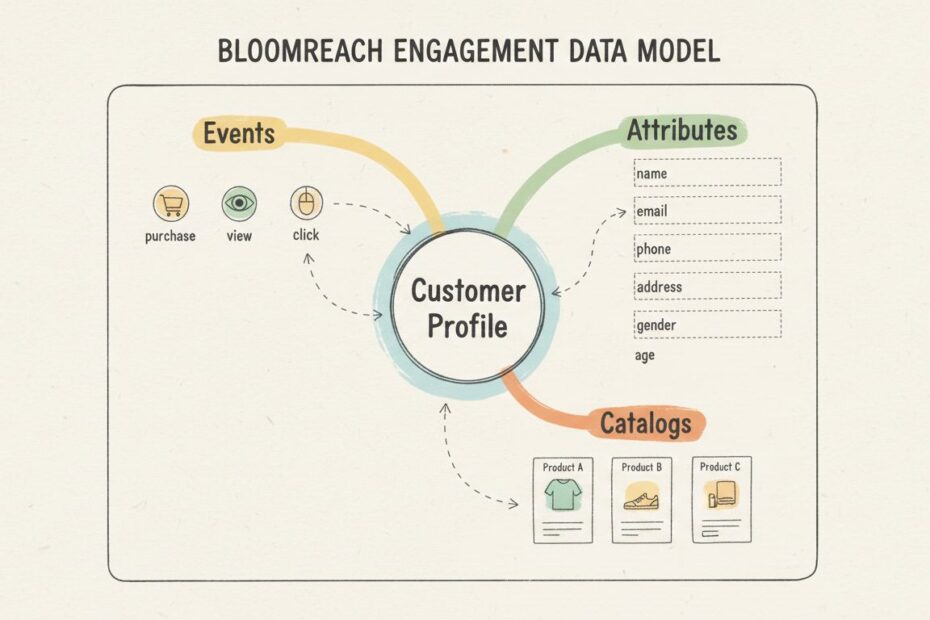
The Bloomreach Engagement data model is the foundation of a modern Customer Data Platform (CDP). It’s designed to capture, organize, and activate customer information across all touchpoints. At its core, the model revolves around a single, unified customer profile that brings together identifiers, behavioral data, and attributes from multiple sources. This centralized approach enables marketers, data teams, and customer service representatives to understand each customer comprehensively and deliver personalized experiences at scale. The platform uses a flexible NoSQL, schema-less database structure that allows you to adapt your data strategy without requiring database redesigns.

What Are the Core Components of the Data Model?
The Bloomreach Engagement data model consists of four primary elements that work together to create a comprehensive customer intelligence system. Understanding each component is essential for implementing the platform effectively and ensuring data quality across your organization. These components interact seamlessly to provide a 360-degree view of your customers and their interactions with your brand. Each element serves a specific purpose while contributing to the overall unified customer experience.
Customers (Profiles)
The customer is the central entity in Bloomreach Engagement. Each customer profile represents a single individual who interacts with your website, mobile app, or other channels. When a visitor first arrives on your site, Bloomreach automatically creates a customer record and assigns a unique cookie identifier. Once the visitor identifies themselves through login, registration, or a purchase, Bloomreach assigns a “hard ID”—typically an email address or your internal customer ID. This hard ID becomes the permanent identifier for that customer. The platform automatically merges data from multiple devices and sessions when matching identifiers are found, ensuring you maintain a single customer view. Customer profiles store identifiers, personal attributes, contact information, preferences, and a complete event history dating back to their first interaction.
Events
Events represent every action a customer takes within your ecosystem. Events are the behavioral data that bring your customer profiles to life. Examples include viewing a product page, adding an item to a shopping cart, completing a purchase, opening an email, clicking a link, or submitting a form. Each event is timestamped and includes properties that describe the action in detail. For e-commerce businesses, common events include view_item, add_to_cart, purchase, and view_item_list. For content publishers, events might include page_view, article_read, and content_download. Events can be tracked automatically through Bloomreach’s JavaScript SDK or sent manually via API integration. The platform stores events in a time-series format, allowing you to analyze customer journeys, identify patterns, and trigger automated responses based on specific behaviors.
Attributes
Attributes are the properties and characteristics stored on customer profiles. They include both standard fields and custom properties tailored to your business needs. Standard attributes encompass contact information (email, phone, postal address), personal details (first name, last name, date of birth, gender), and system-generated data (registration date, last login). Custom attributes might include loyalty program status, customer lifetime value, preferred language, product category interests, or any other data relevant to your marketing strategy. Attributes can be populated through event properties, direct data imports, predictive models, or third-party integrations. Unlike events, which represent actions at specific moments in time, attributes represent the current or historical state of a customer. A customer can have up to 255 attributes depending on their contract, with each attribute supporting multiple data types including strings, numbers, booleans, dates, objects, and arrays.
Catalogs
Catalogs function as reference tables that store information about products, articles, services, or any other items your business offers. Each catalog entry has a unique identifier and associated properties like name, price, category, description, inventory status, and custom fields. Catalogs enable you to enrich event data with product information and power recommendation engines. When a customer triggers a purchase event, the catalog provides detailed product information that helps you understand what was bought and why. Catalogs support multiple attributes per item and can be updated in real-time, making them ideal for dynamic product information like pricing, stock levels, and promotional status.
How Does the Single Customer View Work?
The single customer view is the crown jewel of Bloomreach Engagement. It consolidates all information about a customer into one accessible profile. When you open a customer’s profile in Bloomreach, you see three primary tabs: Overview, Properties and Events, and Consents. The Overview tab displays basic information (contact details, personal details), key metrics from the last 30 days (items viewed, purchases, revenue), and recent activity. The Properties and Events tab shows the complete list of customer attributes, segmentation membership, predictive scores, and a chronological event history. The Consents tab manages privacy preferences and communication opt-ins. The single customer view is updated in real-time as new events are tracked and attributes are updated. This means your team always works with the most current customer information, enabling timely and relevant engagement.
What Are the Best Practices for Implementing a Bloomreach Data Model?
Implementing a robust Bloomreach data model requires careful planning and attention to data quality. Here are the critical best practices that successful organizations follow:
1. Define Clear Data Governance Standards
Establish naming conventions for events and attributes before you begin tracking. Use consistent, descriptive names that your entire team understands. For example, use purchase rather than buy or order, and use view_item rather than product_view or item_seen. Document your event and attribute taxonomy in a shared data dictionary. This prevents duplicate or conflicting data definitions and makes it easier to analyze data across your organization.
2. Ensure Data Type Consistency
Bloomreach supports multiple data types: strings, numbers, booleans, dates, objects, and arrays. Ensure that data is sent in the correct format. Dates should be sent as Unix timestamps (seconds since epoch), not as formatted strings. Email addresses should always be lowercased and trimmed of whitespace. Numbers should be sent as numeric values, not strings. The platform will attempt automatic type conversion, but this can lead to unexpected results. A red information icon in Data Manager indicates a data type mismatch that will cause issues, while a grey icon indicates automatic conversion is occurring.
3. Validate Custom Identifiers
If you use custom identifiers beyond the standard hard ID (such as user_id, account_id, or loyalty_number), ensure these are registered in your Bloomreach project administration settings. Without proper registration, tracking calls containing these identifiers will be discarded silently. Contact your Bloomreach consultant or customer success manager to register custom identifiers before deploying tracking code to production.
4. Implement Proper Event Tracking
Track events at the right granularity level. For e-commerce, track both view_item and purchase events with complete product information. Include event properties that provide context, such as product ID, category, price, and quantity. For purchase events, include the total transaction value, discount amount, and coupon codes. Avoid tracking the same action multiple times through different methods, as this creates duplicate data and skews analytics.
5. Manage Attribute Limits and Storage
You can store up to 255 customer attributes (or 1024 in some contracts), with each attribute supporting up to 128KB of data. Monitor your attribute usage and periodically review whether all tracked attributes are actively used. Remove obsolete attributes and consolidate related data. For example, instead of tracking product_viewed_1, product_viewed_2, product_viewed_3, use an array attribute called recently_viewed_products.
6. Establish Data Quality Monitoring
Use Bloomreach’s Data Manager to regularly review tracked values and identify issues. Create a monthly QA process to check for incorrect data types, missing required attributes, and unexpected values. The “Show tracked values” feature provides a sample of actual data being sent, helping you spot problems early. Implement validation rules in your tracking code to prevent invalid data from being sent to Bloomreach.
What Are Common Mistakes to Avoid?
Understanding common pitfalls helps you implement Bloomreach more effectively and avoid costly errors that affect data quality and campaign performance.
Mistake 1: Inconsistent Email Handling
Failing to standardize email addresses is one of the most common errors. Email addresses should always be lowercased and trimmed of leading/trailing whitespace before being sent to Bloomreach. This ensures accurate customer matching and prevents duplicate profiles. For example, “John.Doe@Example.COM” and “john.doe@example.com” should be treated as the same customer.
Mistake 2: Tracking Events Without Context
Sending events without sufficient property information limits your ability to analyze and segment customers effectively. A purchase event should include product ID, category, price, quantity, and transaction total. A view_item event should include product information and the context of how the customer found the item. Without this context, you cannot build meaningful segments or personalization rules.
Mistake 3: Creating Too Many Custom Attributes
While Bloomreach’s flexible schema allows you to create numerous attributes, storing hundreds of rarely-used attributes slows down profile loading and complicates your data model. Be selective about what you track. Ask whether each attribute will be used for segmentation, personalization, or analysis. If the answer is no, don’t track it.
Mistake 4: Ignoring Data Type Validation
Sending data in incorrect formats creates silent failures and unexpected behavior. Dates sent as strings instead of timestamps, numbers sent as strings, and boolean values sent as “Y”/”N” instead of true/false all cause issues. These problems are difficult to debug because the data appears to be tracked but doesn’t behave as expected.
Mistake 5: Not Registering Custom Identifiers
If you use custom identifiers beyond the default hard ID, they must be registered in Bloomreach administration. Tracking calls with unregistered custom identifiers are silently discarded, leading to incomplete customer profiles and missing data.
Mistake 6: Failing to Merge Duplicate Profiles
Without proper identifier management, customers using multiple devices or email addresses may create duplicate profiles in Bloomreach. While the platform attempts to merge profiles when matching identifiers are found (like when a customer logs in from a new device), incomplete identifier strategies lead to fragmented customer views.
How Can You Implement Bloomreach for E-Commerce?
E-commerce businesses benefit tremendously from Bloomreach Engagement. Here’s how to structure your data model for maximum impact:
Essential Events for E-Commerce
| Event Type | Purpose | Key Properties | Example Use Case |
|---|---|---|---|
view_item | Track product page visits | product_id, category, price, image_url | Understand product interest patterns |
view_item_list | Track category or search results browsing | category, list_name, item_count | Analyze category engagement |
add_to_cart | Track items added to shopping cart | product_id, quantity, price, cart_value | Identify abandoned cart opportunities |
remove_from_cart | Track items removed from cart | product_id, quantity, reason | Understand purchase hesitation |
purchase | Track completed transactions | product_id, quantity, price, total_price, coupon_code, revenue | Analyze purchase behavior and AOV |
refund | Track returned items | product_id, quantity, reason, refund_amount | Monitor product quality and returns |
Critical Customer Attributes for E-Commerce
- Identifiers: email, customer_id, phone_number
- Personal: first_name, last_name, date_of_birth
- Engagement: total_purchases, total_revenue, last_purchase_date, average_order_value
- Preferences: preferred_category, price_sensitivity, preferred_brand
- Loyalty: loyalty_tier, loyalty_points, membership_status
- Behavioral: items_viewed_count, abandoned_cart_value, product_returns_count
Real-World E-Commerce Example
Sarah visits an online fashion retailer. When she lands on the site, Bloomreach creates an anonymous customer profile. She browses the women’s dresses category and views three products. The system tracks three view_item events with product IDs, prices, and categories. She adds a blue dress priced at $89.99 to her cart, triggering an add_to_cart event. Later, she returns, logs in using her email, and Bloomreach identifies her as a returning customer. The system merges her anonymous profile with her registered profile, revealing she’s made three previous purchases totaling $450 in the last six months. She completes her purchase of the blue dress, triggering a purchase event that includes the product information, discount applied, and total transaction value of $75.99 (after a 15% loyalty discount). Her customer attributes are updated to reflect her new total revenue, last purchase date, and loyalty points earned.
How Can You Implement Bloomreach for Retail?
Retail businesses can leverage Bloomreach to create omnichannel customer experiences that blend online and offline interactions:
Tracking In-Store and Online Events
Retail implementations should track both digital events (website visits, online purchases) and offline events (in-store purchases, loyalty card scans). You can send offline events via API after they occur in your point-of-sale system. Include location information and associate events with the customer’s Bloomreach profile using their email, phone number, or loyalty ID. This creates a unified view of customers across all channels.
Loyalty Program Integration
Connect your loyalty program to Bloomreach to automatically update customer attributes with loyalty status, points balance, and tier level. When a customer makes a purchase in-store or online, update their loyalty points in real-time. Use Bloomreach to trigger personalized communications based on loyalty status, such as exclusive offers for VIP members or reminders for customers approaching tier milestones.
Location-Based Personalization
Use location attributes to deliver personalized experiences. Track which stores customers visit, their purchase history by location, and their preferred products at each location. Use this information to send location-specific promotions or recommendations when customers are near a store.
What Role Does Voxwise Play in Bloomreach Implementation?
Many organizations struggle with Bloomreach implementation because data modeling is complex and mistakes early on compound over time. Voxwise brings deep expertise in designing and implementing Bloomreach data models based on real-world experience across retail, e-commerce, and direct-to-consumer brands. Voxwise helps organizations:
- Design comprehensive data strategies that align with business objectives and marketing goals
- Establish data governance frameworks that ensure consistency, quality, and compliance
- Optimize event and attribute schemas for your specific business model and use cases
- Implement proper tracking infrastructure with validation and quality assurance
- Migrate and consolidate data from legacy systems into Bloomreach
- Train teams on best practices and data management
- Monitor and audit data quality on an ongoing basis
Rather than treating Bloomreach as a standalone tool, Voxwise helps organizations view it as a strategic asset that drives customer understanding and marketing effectiveness. By establishing the right data foundations from the start, organizations avoid costly rework and unlock the full potential of their customer data platform.
Key Takeaways
The Bloomreach Engagement data model is built on four core components: customers (unified profiles), events (behavioral actions), attributes (customer properties), and catalogs (product/item references). Success depends on clear data governance, consistent naming conventions, proper data type management, and ongoing quality assurance. Common mistakes—like inconsistent email handling, incomplete event properties, and unregistered custom identifiers—are easily avoidable with proper planning. E-commerce and retail businesses have distinct data modeling needs, but both benefit from a structured approach to tracking and profile enrichment. Organizations serious about maximizing their CDP investment should establish strong data foundations and consider expert guidance to ensure their implementation strategy aligns with business goals and industry best practices.
Ready to Optimize Your Bloomreach Data Model?
Implementing Bloomreach correctly from the start saves time, reduces errors, and ensures your customer data platform delivers maximum business value. Whether you’re planning a new implementation, auditing an existing setup, or looking to improve data quality and utilization, expert guidance makes a significant difference.
Voxwise specializes in helping organizations design, implement, and optimize their Bloomreach data models. Our team has worked with leading e-commerce, retail, and direct-to-consumer brands to establish data strategies that drive personalization, segmentation, and marketing automation excellence.