
How to Structure Customer Data in Bloomreach Engagement
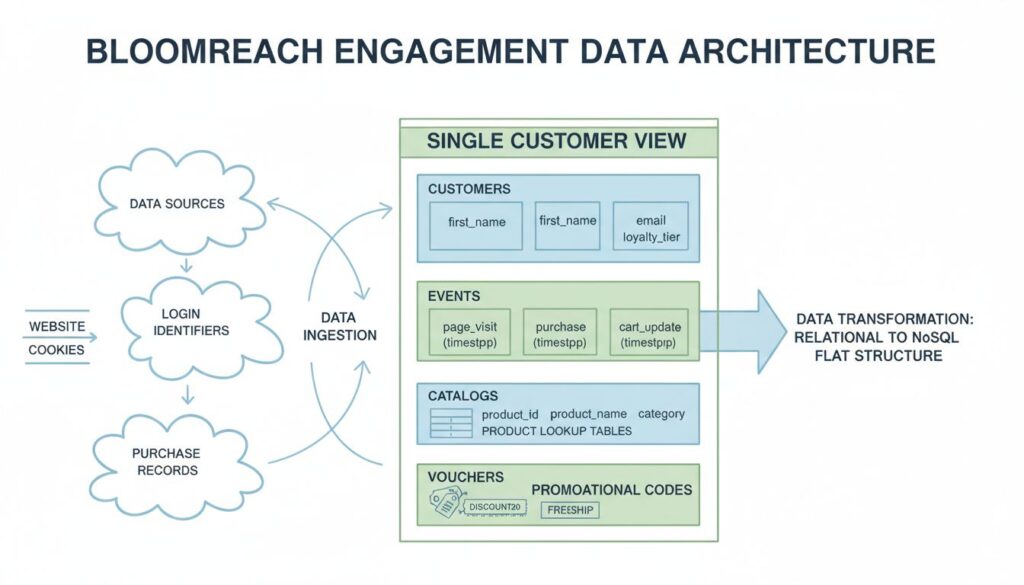
Building an effective customer data structure in Bloomreach Engagement requires understanding how the platform fundamentally differs from traditional relational databases. Bloomreach stores data in a NoSQL architecture where everything centers on the individual customer as the core entity. Your success depends on properly mapping four distinct data layers: Customers (identifiers and profile attributes), Events (behavioral streams), Catalogs (product lookup tables), and Vouchers (promotional code pools). This guide walks you through the exact technical specifications and operational steps required to eliminate data latency, protect brand margins, and unlock real-time personalization at scale.
How to Structure Customer Data in Bloomreach Engagement
How should you structure customer data to maximize personalization speed and campaign accuracy in Bloomreach Engagement?
The answer requires organizing data across four core elements as a flat, denormalized structure where base data types (strings, numbers, booleans, datetimes, and simple lists) flow directly into the platform in real time. Hard IDs and soft IDs must map customer identities across devices and sessions. Static attributes stay separate from behavioral event streams. Product catalogs remain independent lookup tables. Promotional vouchers are stored as discrete fulfillment pools. This architecture eliminates the processing delays that plague relational database approaches and enables the platform to calculate dynamic segments and trigger automated campaigns instantly.
Before You Start
Before implementing your Bloomreach data structure, confirm that your organization has the following prerequisites in place:
Technical requirements: You need direct access to Bloomreach’s REST API or the ability to configure JavaScript SDK implementations on your web properties. If your stack uses a CDP connector or middleware, verify that it supports real-time event streaming and flat data payloads. Your data engineering team should be comfortable with NoSQL concepts and understand the difference between immutable event logs and mutable customer attributes.
Data inventory and mapping: Document all customer data sources currently in your business systems (CMS, order management system, loyalty platform, website analytics tool, email service provider). Map each data point to one of Bloomreach’s four core layers: Customers, Events, Catalogs, or Vouchers. Identify which attributes change infrequently (static) and which represent real-time actions (events). This prevents costly rework after integration begins.
Identity resolution strategy: Decide how you will identify customers across anonymous and authenticated states. Define your hard ID (typically customer email or internal ID) and your soft IDs (cookie IDs, device IDs, or session tokens). Understand that Bloomreach automatically merges customer records when matching hard IDs are detected, so consistency in your ID scheme is critical.
Governance and naming standards: Establish naming conventions for all attributes and events before sending the first data point. Inconsistent naming (such as “first_name” in one feed and “firstName” in another) breaks downstream segmentation rules and requires manual cleanup. Create a data dictionary documenting every attribute, its data type, update frequency, and business purpose.
The Four Core Elements of Bloomreach Data Structure
Customers: The Identity and Profile Layer
The Customers layer holds the master profile for each individual interacting with your brand. This layer stores identifiers (hard IDs and soft IDs) and slow-changing demographic and behavioral attributes that define who the customer is, not what they do.
What belongs in the Customers layer:
Static attributes such as first_name, last_name, email, phone_number, postal_address, date_of_birth, gender, registration_date, loyalty_tier, subscription_status, communication_consent_status, preferred_language, and account_type. These attributes change infrequently, often only when the customer manually updates their profile or when your business applies a status change (such as upgrading a customer from bronze to silver loyalty tier).
Identifiers including hard IDs (customer_id, email) and soft IDs (cookie_id, device_id, anonymous_id). Bloomreach uses hard IDs to merge anonymous browsing histories into identified customer profiles. For example, when an anonymous customer with cookie_id “abc123” logs in with email “jane@example.com”, Bloomreach matches the hard ID and consolidates all prior actions into a single customer record.
Why this matters for your business:
The Customers layer is your baseline single customer view. Every downstream segmentation, personalization rule, and campaign trigger depends on accurate, consistent profile data. Clean customer attributes enable you to populate dynamic email subject lines via Jinja token personalization, filter campaign visibility by regional compliance status, and build lifecycle segments based on loyalty tier or subscription status.
How to implement it:
Structure your customer import or SDK call with only static attributes. For example:
Push profile updates through the Tracking API or bulk CSV imports. Use the Data Manager in Bloomreach to define each attribute’s data type and update frequency. Never include time-stamped action data (such as purchase history or page views) in the Customers layer. That belongs in Events.
Direct business impact:
Accurate customer attributes lift email open rates by 15 to 25 percent through dynamic personalization. Proper consent tracking protects your brand from regulatory penalties and list decay. Loyalty tier segmentation enables margin-protected promotional campaigns that maximize CLV without eroding gross margin.
Events: The Behavioral Stream Layer
The Events layer captures every action a customer performs with your brand, stored as immutable, time-stamped records. Events are the fuel that powers real-time automation, behavioral segmentation, and predictive analytics.
What belongs in the Events layer:
Every customer interaction that carries business meaning: page_visit, view_item, view_category, cart_update, checkout, purchase, purchase_item, wishlist_add, review_submit, email_click, email_open, support_contact, return_initiated, product_search, filter_applied, and any custom events specific to your business model. Each event can carry up to 255 attributes, allowing you to capture rich context around the action.
For a purchase event, attributes might include: timestamp, product_id, product_name, sku, quantity, unit_price, total_price, discount_applied, discount_amount, currency, payment_method, shipping_address_country, and coupon_code. For a page_visit event: timestamp, page_url, page_title, referrer_url, device_type, browser, and utm parameters.
Why this matters for your business:
Events are the only data source that triggers real-time automation. When a customer adds an item to their cart, that cart_update event fires immediately, enabling your system to launch an abandoned cart recovery sequence within minutes. When a customer completes a purchase, the purchase event feeds aggregates that recalculate lifetime value instantly. Behavioral events are the raw material for dynamic segmentation, enabling you to build segments like “customers who viewed product X but did not purchase in the last 7 days” or “high-intent browsers who spent more than 5 minutes on product pages.”
How to implement it:
Use the JavaScript SDK to track page_visit and view_item events as customers browse your website in real time. Configure your e-commerce platform to push purchase and cart_update events via the REST API immediately after the action occurs. Implement a flat, denormalized event structure with only base data types (no nested objects).
Example cart_update event:
Maximum 255 attributes per event means you can capture detailed context without flattening your data structure further. Never nest objects or arrays inside event attributes. If you need to track multiple products in a single purchase, send one purchase_item event per product, not a nested array.
Direct business impact:
Real-time event tracking reduces cart abandonment by enabling immediate recovery campaigns. Abandoned cart emails sent within 1 hour have 5 to 8 times higher conversion rates than emails sent after 24 hours. Event-driven segmentation enables you to identify high-intent customers in real time and serve them premium product recommendations, lifting average order value by 12 to 18 percent. Accurate event data feeds Bloomreach’s predictive models, which calculate churn risk and purchase propensity scores that guide lifecycle automation.
Catalogs: The Non-Customer Relational Layer
The Catalogs layer holds lookup tables containing product data and other business reference information independent of individual customer profiles. Catalogs enable you to enrich event data on the fly without inflating the event log or slowing down real-time processing.
What belongs in the Catalogs layer:
Product master data including item_id (primary key), product_name, sku, category, subcategory, brand, price, cost, margin_percentage, stock_status, inventory_count, image_url, description, size_variant, color_variant, weight, dimensions, supplier_id, and any other product attribute relevant to merchandising or fulfillment. If your business sells multiple product types or operates multiple brands, you may have multiple catalogs.
Catalog data is structured with a primary key (item_id) and updated via scheduled imports or real-time API pushes. Unlike customer attributes or events, catalog data is not tied to individual customers. Instead, when an event includes a product_id, Bloomreach looks up that product’s current attributes in the catalog and makes them available for segmentation and personalization.
Why this matters for your business:
Catalogs prevent your event stream from bloating with redundant product data. Instead of sending product_name, price, category, and image_url with every purchase event, you send only the product_id. Bloomreach joins that ID with the catalog at query time, retrieving current product attributes. This design eliminates data duplication and ensures that product information stays fresh. If you update a product’s price or category in the catalog, all historical events referencing that product automatically reflect the new data when you build segments or personalization rules.
Catalogs also enable real-time product recommendations and behavioral merchandising. Bloomreach can recommend products from specific categories, price ranges, or inventory levels in real time. You can build segments like “customers who viewed products in the Men’s Coats category but did not purchase” and automatically serve them follow-up emails with coat recommendations and limited-time discounts.
How to implement it:
Create a CSV file or JSON feed containing your product master data. Push it to Bloomreach via the Data Import API on a daily or hourly schedule, depending on how frequently your product data changes. Example catalog structure:
In your events, reference products only by their item_id:
Bloomreach automatically enriches this event with current catalog attributes (product_name: “Wool Blend Winter Coat”, category: “Men’s Coats”, etc.) when you build segments or send campaigns.
Direct business impact:
Catalog-driven segmentation prevents out-of-stock campaign errors that damage brand trust and waste marketing spend. You can build a segment that targets customers with low-stock products and automatically removes them from campaigns as inventory runs out. Margin-aware catalogs enable you to run profitable promotional campaigns. For example, you can build a segment of “high-value customers who purchased low-margin items” and exclude them from deep discount campaigns, protecting gross margin. Real-time product recommendations driven by catalog data lift average order value by 8 to 15 percent.
Vouchers: The Campaign Fulfillment Layer
The Vouchers layer manages promotional codes and discount fulfillment, ensuring that unique codes are distributed to the right customer segments and tracked accurately for attribution and ROI analysis.
What belongs in the Vouchers layer:
A pool of unique, single-use promotional codes with associated metadata: voucher_code, campaign_id, discount_amount, discount_type (fixed or percentage), expiration_date, max_redemptions, applicable_categories, minimum_purchase_amount, and redemption_status. Vouchers can be generic codes used across multiple customers or unique codes issued to individual customers.
Why this matters for your business:
Vouchers prevent code presentation failures and protect brand margins by ensuring that discount codes are issued only to designated audiences. Without proper voucher management, customers can share codes on social media, leading to margin erosion and campaign attribution confusion. Bloomreach tracks voucher usage, enabling you to measure campaign ROI accurately and identify which customer segments respond to specific discount types.
How to implement it:
Generate a pool of unique codes using your promotional code generator. Upload the codes to Bloomreach via CSV import with the following structure:
In your campaigns, use Jinja template syntax to insert unique voucher codes:
Bloomreach automatically tracks which customers received which codes, when codes were redeemed, and the revenue impact of each campaign.
Direct business impact:
Voucher-driven campaigns restore slipping customer segments safely. A win-back campaign targeting lapsed customers with a 15 percent discount can increase reactivation rates by 25 to 40 percent while maintaining margin control. Unique voucher codes enable accurate campaign attribution, allowing you to measure which customer segments, channels, and offers drive the highest ROI. Proper voucher management protects brand margins by preventing code sharing and limiting redemptions to intended audiences.
Step-by-Step Guide to Structuring Your Data Architecture
Step 1: Configure Your Identity Resolution Strategy
Define your hard ID and soft ID scheme before sending any data to Bloomreach. Your hard ID must be a unique, persistent identifier that remains constant for each customer across all systems and devices. Common choices include customer_id (your internal CRM ID) or email address. Your soft IDs capture anonymous browsing sessions: cookie_id for web browsers, device_id for mobile apps, and session_id for temporary tracking.
Create a mapping document showing how each system in your business (website, mobile app, email platform, loyalty system, order management system) will pass these identifiers to Bloomreach. For example:
- Website: Pass cookie_id from JavaScript SDK on page_visit events. Pass email as hard ID when customer logs in.
- Mobile app: Pass device_id as soft ID. Pass customer_id as hard ID after login.
- Order management system: Pass customer_id as hard ID with purchase events imported via API.
Test your identity resolution by tracking a test customer across multiple devices and sessions. Verify that Bloomreach correctly merges records when the customer logs in from a new device.
Step 2: Define and Filter Extensible Profile Attributes
Inventory all customer attributes currently stored across your business systems. Categorize each attribute as static (changes infrequently) or dynamic (changes frequently or is event-driven). Move static attributes to the Customers layer. Move dynamic attributes to the Events layer or create aggregates that calculate them in real time.
Static attributes to include in Customers layer:
- Demographics: first_name, last_name, date_of_birth, gender
- Contact: email, phone_number, postal_address, city, state, country, postal_code
- Business attributes: customer_id, loyalty_id, subscription_status, subscription_tier, subscription_start_date, communication_consent_status, preferred_language, account_type
Dynamic attributes to exclude from Customers layer (move to Events or aggregates):
- Purchase history (track via purchase events instead)
- Browse history (track via page_visit and view_item events)
- Cart contents (track via cart_update events)
- Last purchase date (calculate via aggregate from purchase events)
- Lifetime value (calculate via aggregate from purchase events)
Use the Bloomreach Data Manager to define each attribute’s data type (string, number, boolean, datetime, list) and set the update frequency. This prevents data type conflicts and ensures consistent validation across imports.
Step 3: Flatten Your Event Taxonomy Rules
Design your event schema before implementing tracking. Document every event type your business will track, the attributes each event will carry, and the business logic that triggers each event. Use a flat, denormalized structure with only base data types.
Create an event taxonomy table:
| Event Type | Trigger | Key Attributes | Max Attributes | Update Frequency |
|---|---|---|---|---|
| page_visit | Customer loads any page | timestamp, page_url, page_title, device_type, utm_source, utm_medium, utm_campaign | 255 | Real-time (SDK) |
| view_item | Customer views product detail | timestamp, product_id, product_name, category, price, referrer_url | 255 | Real-time (SDK) |
| cart_update | Customer adds/removes from cart | timestamp, product_id, quantity, unit_price, total_price, cart_value_total, action (add/remove) | 255 | Real-time (SDK) |
| purchase | Customer completes transaction | timestamp, product_id, quantity, unit_price, total_price, discount_amount, coupon_code, payment_method, shipping_country | 255 | Real-time (API) |
| email_click | Customer clicks email link | timestamp, email_id, campaign_id, link_url, link_text | 255 | Real-time (API) |
Never nest objects or arrays within event attributes. If you need to track multiple products in a single purchase, send one purchase_item event per product. If you need to track product variants, flatten variant attributes into the event: product_id, variant_size, variant_color, variant_sku.
Step 4: Integrate Catalogs and Data Feeds
Set up your product catalog import process. Determine the update frequency (hourly, daily, or real-time) based on how often your product data changes. For most e-commerce businesses, daily updates are sufficient. For high-velocity inventory environments (such as fashion or electronics), hourly updates are recommended.
Configure your catalog import:
- Export your product master data from your product information management (PIM) system or e-commerce platform as CSV or JSON.
- Map your internal product ID to Bloomreach’s item_id field (primary key).
- Include all attributes needed for segmentation and personalization: product_name, category, price, cost, margin_percentage, stock_status, image_url, brand, supplier_id.
- Schedule the import via Bloomreach’s Data Import API to run on your desired frequency.
- Validate that product counts and attributes match your source system after the first import.
Example API call to trigger catalog import:
Step 5: Layer Aggregates, Expressions, and Predictions
Build calculated attributes that derive from raw event data in real time. Aggregates are the foundation of behavioral segmentation and CLV modeling.
Common aggregates to implement:
- total_spent: Sum of all purchase total_price values
- purchase_count: Count of all purchase events
- last_purchase_date: Timestamp of most recent purchase event
- days_since_last_purchase: Current date minus last_purchase_date
- average_order_value: total_spent divided by purchase_count
- most_purchased_category: Category with highest count from purchase events
- total_items_purchased: Sum of quantity from all purchase_item events
Expressions are custom calculations built on top of aggregates and static attributes:
- high_value_customer: IF total_spent greater than 500 THEN true ELSE false
- repeat_customer: IF purchase_count greater than or equal to 2 THEN true ELSE false
- at_risk_customer: IF days_since_last_purchase greater than 90 AND purchase_count greater than 0 THEN true ELSE false
- vip_segment: IF loyalty_tier equals “gold” OR total_spent greater than 1000 THEN true ELSE false
Predictions are machine learning models trained on historical customer behavior:
- churn_probability: Likelihood customer will not purchase in next 30 days (0 to 1 scale)
- purchase_propensity: Likelihood customer will purchase in next 7 days (0 to 1 scale)
- ltv_prediction: Predicted customer lifetime value over next 12 months
Configure aggregates and expressions in the Bloomreach Data Manager. Train predictions using Bloomreach’s AI engine or import pre-calculated scores from your data warehouse via the API.
Tools and Data You Need
Technical infrastructure:
- Bloomreach Engagement account with API access and REST API keys
- JavaScript SDK integrated on all web properties (or mobile SDKs for app tracking)
- CSV import capability or API integration layer for batch data loads
- Data warehouse or CDP middleware capable of exporting customer and product data
- Real-time event streaming from your e-commerce platform (order management system, cart system, payment processor)
Data sources:
- Customer master data: CRM system, email platform, loyalty system
- Product data: Product information management (PIM) system, e-commerce platform, inventory management system
- Behavioral data: Website analytics, mobile app tracking, email engagement data
- Transaction data: Order management system, payment processor, shipping system
- Promotional data: Email marketing platform, discount code generator, loyalty program
Team skills:
- Data engineer or API integration specialist: Responsible for configuring SDK implementations and API connections
- Database specialist: Responsible for designing the data schema, defining attributes, and ensuring data quality
- CRM manager or marketing operations: Responsible for defining business logic, building segments, and configuring campaigns
- Analytics engineer: Responsible for defining aggregates, expressions, and validation rules
Documentation:
- Data dictionary: Document every attribute, event, catalog field, and voucher code with definitions, data types, and business purpose
- Event taxonomy: Document every event type, its trigger, and its attributes
- Identity resolution mapping: Document how each system passes hard IDs and soft IDs to Bloomreach
- Data quality rules: Document validation rules, expected ranges, and error handling procedures
Common Challenges
Challenge 1: Relational Database Thinking
The most common mistake is attempting to mirror your existing relational database structure into Bloomreach. Relational databases normalize data across multiple tables with foreign keys and lookups. Bloomreach uses a denormalized, flat NoSQL structure where all customer data lives as attributes on a single customer record.
If you try to replicate a relational structure, you will create nested objects and arrays that slow down real-time processing. For example, do not send:
Instead, flatten the data and send one event per item:
Challenge 2: Inconsistent Attribute Naming
Sending the same data point with different names across different imports breaks downstream segmentation and reporting. If one import sends “first_name” and another sends “firstName”, Bloomreach treats them as two separate attributes, causing segments to fail or return incomplete results.
Establish naming conventions before any data integration begins. Use lowercase with underscores (snake_case) for all attribute names. Create a data dictionary and enforce it across all systems. Use the Data Manager to lock down attribute names and data types to prevent future inconsistencies.
Challenge 3: Event Batching and Latency
Batching events and importing them hours after they occur defeats the purpose of real-time personalization. If a customer abandons their cart at 2 PM but you do not import the cart_update event until 8 PM, your abandoned cart recovery email will arrive too late to influence the purchase decision.
Implement real-time event streaming using the JavaScript SDK for web events and the REST API for backend events (orders, returns, support interactions). Push events to Bloomreach within seconds of the action occurring. If you must batch events, keep the batch window to less than 5 minutes.
Challenge 4: Unmapped or Undefined Attributes
Sending data without first defining the attribute in the Data Manager causes Bloomreach to accept the data but treat it as a dynamic, untyped field. This causes validation errors, breaks aggregates, and prevents proper segmentation.
Define all attributes in the Data Manager before sending data. Specify the data type (string, number, boolean, datetime, list), whether the attribute is static or dynamic, and whether it should be indexed for fast querying. This prevents data quality issues and ensures consistent behavior.
Challenge 5: Voucher Code Leakage
If you upload voucher codes without properly controlling distribution, customers will share codes on social media, leading to unintended redemptions and margin erosion. Always use unique codes tied to specific customer segments and expiration dates.
Generate unique codes for each campaign. Upload codes to Bloomreach with clear metadata (campaign_id, expiration_date, applicable_categories, minimum_purchase_amount). Use Jinja template syntax to insert unique codes into campaign messages. Track redemptions and compare actual redemptions to planned redemptions to identify code leakage.
How to Measure Success
Metric 1: Data Ingestion Latency
Measure the time between when a customer action occurs and when the event appears in Bloomreach. For real-time events (page_visit, cart_update), latency should be less than 5 seconds. For backend events (purchase, return), latency should be less than 30 seconds.
High latency indicates that your event streaming is batched or delayed. Investigate your SDK implementation, API configuration, and network connectivity. Reduce batch sizes and increase push frequency.
Metric 2: Data Completeness
Compare the number of customers, events, and products in Bloomreach to your source systems. Data completeness should be 99 percent or higher. Missing data indicates import failures, schema mismatches, or network issues.
Run daily reconciliation reports comparing Bloomreach customer counts to your CRM, event counts to your analytics system, and product counts to your PIM system. Investigate any discrepancies larger than 1 percent.
Metric 3: Segment Accuracy
Build a test segment in Bloomreach and manually verify that the segment membership matches your business logic. For example, if you build a segment of “customers who purchased in the last 30 days,” manually verify that the segment includes at least 95 percent of customers who actually purchased in the last 30 days in your source system.
Inaccurate segments indicate data quality issues, incorrect aggregate calculations, or logic errors. Investigate the segment definition and underlying data.
Metric 4: Campaign Performance Lift
Compare campaign metrics before and after implementing Bloomreach data structure. Key metrics include email open rate, click-through rate, conversion rate, and revenue per email.
Expected improvements from proper data structuring:
- Email open rate: 15 to 25 percent lift from dynamic personalization
- Click-through rate: 20 to 35 percent lift from behavioral segmentation
- Conversion rate: 10 to 18 percent lift from targeted offers and recommendations
- Average order value: 8 to 15 percent lift from product recommendations
Metric 5: Customer Lifetime Value (CLV)
Calculate CLV for customers in Bloomreach-driven campaigns versus control groups. CLV should increase by 20 to 40 percent within 6 months of implementing proper data structure and automated campaigns.
CLV improvement comes from two sources: increased purchase frequency (more campaigns trigger) and increased average order value (better targeting and recommendations). Measure both components separately to understand which drives your improvement.
How Voxwise Can Help
Structuring customer data in Bloomreach requires deep technical expertise combined with strategic business thinking. Voxwise specializes in designing and implementing customer data platforms and Bloomreach integrations for e-commerce and retail brands. Our team of data engineers, CRM architects, and marketing technologists removes the technical friction of enterprise data integration.
Voxwise services for Bloomreach implementation:
- Data architecture design: We map your customer, product, and behavioral data to Bloomreach’s four core layers, ensuring a flat, denormalized structure that eliminates latency and maximizes personalization speed.
- Identity resolution strategy: We design hard ID and soft ID mapping schemes that correctly merge anonymous and identified customer profiles across all devices and channels.
- Event taxonomy development: We define your complete event schema, including all event types, attributes, validation rules, and real-time streaming pipelines.
- SDK and API implementation: We integrate the Bloomreach JavaScript SDK on your web properties and configure REST API connections to your order management system, inventory system, and email platform.
- Catalog and data feed setup: We build automated product catalog imports and real-time event streaming pipelines that keep your Bloomreach data fresh and accurate.
- Data quality monitoring: We implement validation rules, reconciliation reports, and alerting to ensure your data remains clean and complete.
- Campaign architecture and automation: We design multi-channel customer journeys that leverage your clean data structure to drive measurable revenue growth.
Voxwise has implemented Bloomreach for dozens of e-commerce and retail brands, from mid-market companies with $10 million annual revenue to enterprise brands with $500 million plus. We understand the specific data challenges of fashion, beauty, home goods, and specialty retail. We have built Bloomreach implementations that drive 25 to 40 percent increases in customer lifetime value within the first 12 months.
Conclusion
Structuring customer data correctly in Bloomreach Engagement is the foundation of effective personalization and marketing automation. The platform’s NoSQL architecture requires a fundamentally different approach than traditional relational databases. By organizing data across four core layers (Customers, Events, Catalogs, Vouchers), implementing a flat, denormalized structure with consistent naming conventions, and establishing real-time data streaming pipelines, you eliminate latency and unlock the platform’s full potential.
The step-by-step process outlined in this guide provides a clear roadmap for implementation. Start by defining your identity resolution strategy, then configure your customer profile attributes, flatten your event taxonomy, integrate your product catalogs, and layer in aggregates and predictions. Measure success through data ingestion latency, segment accuracy, and campaign performance lift. With proper data structure in place, Bloomreach becomes a powerful engine for real-time personalization, dynamic segmentation, and revenue-driving automation.
Improve Your Bloomreach Implementation with Voxwise
Your data structure directly determines the speed and accuracy of your personalization engine. Voxwise helps e-commerce and retail brands design, implement, and optimize their Bloomreach data layers to drive measurable customer lifetime value growth.
Request a 30-Minute Customer Engagement Consultation to discuss your segmentation and personalization strategy with our team.
Get a CRM Maturity Check to understand where your current capabilities stand and what optimization opportunities exist.
Check Your Bloomreach Setup if you already have the platform in place and want to optimize execution.