How to Use Behavioral Triggers in Marketing Automation
Behavioral triggers are the operational engine behind modern customer engagement. Unlike calendar-driven batch campaigns that treat all customers identically, behavioral triggers activate marketing actions instantly when a customer takes a specific action. This shift from static scheduling to real-time response directly reduces list fatigue, improves message relevance, and protects your brand margins by preventing discount-driven desperation. For e-commerce and retail brands managing high customer volumes, behavioral triggers represent the difference between reactive marketing and predictive revenue protection.
Before You Start
Implementing behavioral triggers requires foundational infrastructure readiness. Your organization must have unified customer identifiers across all touchpoints, real-time event tracking capability at the application level, and documented customer communication preferences. Verify that your current CRM or marketing automation platform can execute Boolean logic conditions, store event streams, and apply frequency-capping rules across multiple channels simultaneously. Additionally, confirm that your data governance team has established clear data retention policies and that legal compliance for GDPR, CCPA, and regional privacy regulations is documented. Without these prerequisites in place, trigger implementation will produce unreliable results and potential compliance violations.
Step 1: Map High-Intent Customer Data Touchpoints
The foundation of behavioral triggers is systematic event tracking. You must identify and instrument every significant customer interaction point across your digital ecosystem. This includes website navigation events, product view tracking with SKU-level granularity, shopping cart additions and removals, checkout progress milestones, transaction completion, and post-purchase interactions. For mobile applications, track app opens, screen views, feature usage, and in-app purchases. For email, track opens, clicks on specific links, and unsubscribe actions. For SMS, track delivery, opt-in status changes, and click-through events.
The critical requirement is standardization. Every event must include a unique customer identifier that matches your primary CRM key, a timestamp accurate to the second, the event category and type, and relevant contextual attributes. For product interactions, include the product SKU, category, price tier, and inventory status. For transactional events, include order value, items purchased, discount applied, and fulfillment status. Create a centralized event taxonomy document that defines every trackable action and its required data fields. This taxonomy becomes your reference for developers implementing tracking code and for marketing teams designing trigger rules.
Expected output: A clean, standardized event stream feeding your CDP or marketing automation platform with complete customer context. Implement validation rules that reject incomplete events and trigger alerts for data quality failures. Test your tracking implementation in a staging environment before deploying to production.
Step 2: Configure Precise Rules-Based Trigger Conditions
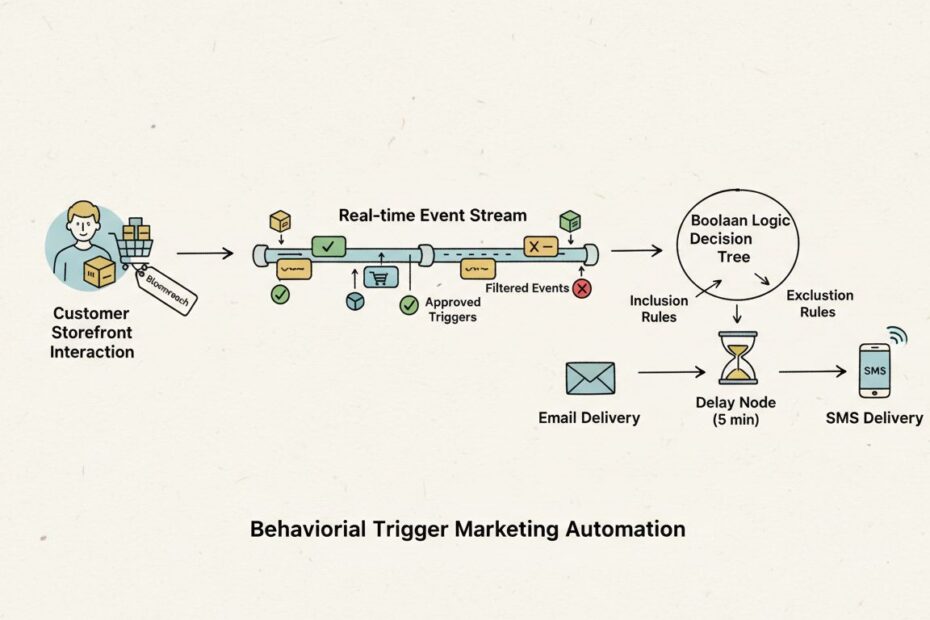
Trigger rules determine exactly when a customer qualifies for an automated campaign. This is where you prevent message chaos by filtering out low-intent actions and managing messaging volume. A trigger rule combines inclusion conditions (which customers should enter the campaign) with exclusion conditions (which customers should never enter, even if they meet inclusion criteria).
Inclusion conditions typically combine multiple signals using AND logic. For example: (Product Category = “Premium Footwear”) AND (Price Page Views = 3 or more) AND (Days Since Last Purchase > 45). This structure ensures you target customers showing genuine purchase intent rather than casual browsers. Exclusion conditions use OR logic to filter out undesirable profiles. For example: (Current Cart Value > 0) OR (Pending Support Ticket = Yes) OR (Unsubscribed from Email = Yes) OR (Opened Email in Last 2 Hours).
Build your trigger rules with dynamic attribute checks that recalculate in real-time. Customer lifetime value (CLV) thresholds change as purchase history accumulates. Frequency caps must reflect the actual number of emails sent in the past 7 days, not a static limit. Recency windows must calculate from the current date, not a fixed date range. Use your platform’s native segmentation logic to ensure rules update automatically without manual intervention.
Expected output: Self-updating trigger flows that isolate high-intent opportunities automatically. Document each rule’s business rationale, expected audience size, and performance targets. Create a rule audit log that tracks changes and who made them, enabling rapid rollback if a rule produces unexpected results.
Step 3: Choreograph Complementary Omnichannel Responses
Once a customer qualifies for a trigger, you must decide which communication channel delivers the message and when. This is omnichannel choreography. The fundamental principle is channel complementarity, not duplication. Email delivers rich context and visual product information. SMS delivers urgency and immediate action. Push notifications deliver time-sensitive alerts. In-app messages deliver contextual help within the product experience.
Define a strict global frequency cap that limits total marketing touches per customer per week across all channels. A common framework is 3 emails, 1 SMS, and 1 push notification per customer per 7 days. Within this cap, sequence your channels strategically. For abandoned cart scenarios, send an email first with full product details and images. If the customer does not click within 24 hours and meets high-value criteria (cart value > $150), trigger an SMS with a shortened link and 24-hour deadline. If the customer still does not respond after 48 hours, suppress further messages and mark them for win-back campaigns 30 days later.
Implement local quiet hours that respect customer time zones and behavioral patterns. Do not send SMS between 9 PM and 8 AM in the customer’s local time zone. For email, avoid sending during typical work hours (9 AM to 5 PM) for B2B audiences unless the content is work-related. Test different send times for your specific audience and measure open rates and click-through rates by hour of day.
Expected output: A fluid, margin-protected multi-channel choreography that adapts dynamically to customer action. Document your channel strategy in a decision tree format that shows when each channel activates and under what conditions messages are suppressed.
Step 4: Track Automation Yields and Incremental Performance Lift
Measuring trigger performance requires isolation of the triggered audience from organic traffic. Without proper measurement, you cannot distinguish between customers who converted because of your trigger and customers who would have converted anyway. Implement holdout control groups where a percentage of qualifying customers (typically 10 to 20 percent) receive no trigger message but are tracked identically to the triggered group.
Track these metrics per trigger type: conversion rate (percentage of triggered customers who completed the desired action), average order value (AOV) for triggered conversions, customer lifetime value lift (CLV of triggered customers versus control group), email open rate, email click-through rate, SMS click rate, and unsubscribe rate. Compare triggered audience metrics directly against the control group using statistical significance tests. A difference is only meaningful if it exceeds your platform’s confidence threshold, typically 95 percent confidence.
Calculate incremental revenue by multiplying the conversion rate lift by the average order value and the number of triggered customers. For example: (Triggered Conversion Rate 8 percent minus Control Conversion Rate 6 percent) times Average Order Value $95 times 10,000 triggered customers equals $19,000 incremental revenue. Subtract the cost of sending the triggered messages to calculate net revenue impact.
Expected output: Centralized analytic transparency that allows for systematic workflow refinement. Create a trigger performance dashboard that updates daily and surfaces underperforming triggers for optimization. Establish a testing calendar that schedules A/B tests on trigger timing, copy variations, and offer types.
Essential Retail Behavioral Triggers in Action
High-Intent Cart and Browse Abandonment Loops
Cart abandonment triggers activate when a customer adds products to their shopping cart but exits without completing purchase. This is high-intent behavior because the customer has already made a selection decision. The trigger should fire within 30 minutes of cart abandonment to capture the customer while context is fresh.
The email should display an itemized cart summary with product images, prices, and a prominent checkout button. Include the product name, size, color, and quantity for each item. Add a brief value proposition explaining why the customer should complete the purchase (e.g., free shipping on orders over $50, loyalty points earned). Optionally include a limited-time discount code valid for 24 hours.
If the customer does not click the email within 24 hours, send an SMS to high-value customers (cart value > $100). The SMS should include a shortened branded link to their cart and a clear deadline (e.g., “Complete checkout by midnight to secure your order”). If the customer still does not convert within 48 hours, suppress further messages and add them to a win-back segment for re-engagement 7 to 14 days later.
Business impact: Cart abandonment recovery typically generates 10 to 25 percent conversion lift, protecting 15 to 30 percent of revenue at risk. This trigger is consistently among the highest ROI automations because the customer has already signaled purchase intent.
Post-Purchase Customer Onboarding and Product Nurturing
Post-purchase triggers activate the moment a customer completes their first transaction. This onboarding sequence builds immediate trust during the critical post-purchase window when the customer is most engaged. The sequence should span 7 to 10 days and deliver 3 to 5 messages focused on product education, care instructions, and satisfaction measurement.
Day 1: Send a purchase confirmation email with order details, tracking information, and estimated delivery date. Include a brief welcome message thanking the customer and highlighting key resources (customer service contact, returns policy, product care guide).
Day 3: Send a product education email with tutorials, care instructions, or usage tips specific to the products purchased. Include links to video content if available. This message reduces buyer’s remorse and early product returns by building customer confidence.
Day 7: Send a customer satisfaction survey (CSAT) asking the customer to rate their purchase experience. Include a simple 1 to 5 star rating system with optional comment field. Use survey responses to identify customers with issues early and route them to customer service.
Day 10: Send a cross-sell or upsell email recommending complementary products or premium upgrades based on the original purchase. For example, if a customer purchased a winter coat, recommend matching scarves, gloves, or thermal base layers.
Business impact: Post-purchase onboarding sequences typically increase second-purchase rates by 15 to 25 percent and reduce product return rates by 10 to 20 percent. The investment in customer education during the first week pays dividends in customer lifetime value and reduced support costs.
Contextual Cross-Selling and Upselling Sequences
Cross-sell triggers activate 7 to 14 days after a customer completes a purchase. This delay allows the customer to receive and evaluate their initial purchase before introducing complementary products. The trigger uses the original purchase category to identify related products with high purchase affinity.
Build a product recommendation engine that identifies items frequently purchased together. For example, customers who buy running shoes also purchase moisture-wicking socks, athletic insoles, and performance shirts. Structure recommendations by price tier: start with products at similar price points, then suggest premium upgrades.
Send an email featuring 3 to 5 recommended products with images, descriptions, and prices. Include a brief personalization note explaining why these products complement the original purchase (e.g., “Based on your recent purchase of trail running shoes, we think you’ll love these moisture-wicking socks”). Add a time-limited offer (valid 7 days) to create urgency without using heavy discounts.
Segment cross-sell sequences by product category and customer lifetime value. High-value customers (cumulative purchases > $500) receive exclusive early access to new products or premium offers. New customers receive introductory discounts on complementary products to build habit formation.
Business impact: Cross-sell sequences typically increase average order value (AOV) by 15 to 30 percent and accelerate customer lifetime value (CLV) growth by 20 to 35 percent. Unlike discount-driven promotions, product recommendations maintain brand margins while increasing customer satisfaction through relevant suggestions.
Tools and Data You Need
| Component | Description | Data Requirements | Platform Examples |
|---|---|---|---|
| Event Tracking Layer | Captures customer interactions in real-time | Unique customer ID, timestamp, event type, contextual attributes | Web analytics SDK, mobile app instrumentation |
| Customer Data Platform | Unifies customer data and executes segmentation logic | Customer profile attributes, event history, calculated metrics (CLV, recency) | Bloomreach Engagement, native CRM data warehouse |
| Rules Engine | Evaluates trigger conditions and determines campaign entry | Inclusion/exclusion rule definitions, frequency caps, recency windows | Marketing automation workflow builder |
| Message Templates | Pre-built email and SMS content with dynamic personalization | Product data, customer attributes, offer details | Email template builder, SMS composer |
| Channel Delivery | Sends messages across email, SMS, push, and in-app | Opt-in consent records, channel preferences, delivery timing rules | Email service provider, SMS gateway, push notification service |
| Analytics and Reporting | Measures trigger performance and calculates incremental lift | Conversion events, revenue attribution, control group comparison | Native platform analytics, data warehouse queries |
Common Challenges
Overlapping Triggers and Message Fatigue: Multiple triggers can fire for the same customer simultaneously, creating excessive messaging. Solve this by implementing a global message queue that evaluates all pending triggers for a customer and selects the highest-priority message based on revenue potential. Suppress lower-priority triggers until the customer engages or a time window expires. Document trigger priority rules and update them quarterly based on performance data.
Data Latency and Timing Misses: Delays between event occurrence and trigger activation cause messages to arrive too late for relevance. A customer abandons a cart at 3 PM but receives the reminder at 9 PM when they are offline. Solve this by selecting a platform with real-time event processing architecture. Bloomreach Engagement processes events with sub-second latency, enabling immediate trigger activation. Test your trigger timing in staging by simulating customer events and measuring elapsed time from event to message send.
Incomplete Customer Data and Failed Personalizations: Missing product data, incomplete customer profiles, or broken dynamic content blocks cause generic or broken messages. Solve this by implementing data validation rules that block trigger activation if required fields are missing. For example, do not send a cart abandonment email if product images are not available. Create fallback content templates for scenarios where dynamic data is unavailable.
Compliance and Privacy Violations: Triggers can activate for customers who have unsubscribed, opted out of SMS, or requested deletion under GDPR. Solve this by adding explicit consent checks to every trigger rule. Include conditions like (Email Opt-In = Yes) AND (SMS Opt-In = Yes) as appropriate for each channel. Implement a data deletion workflow that removes customer records from trigger systems immediately upon request.
Attribution and Revenue Measurement Errors: Assigning credit for conversions is complex when customers interact with multiple triggers before converting. Solve this by implementing first-touch, last-touch, and multi-touch attribution models. Compare results across models to understand which triggers drive initial interest versus final conversion. Use holdout control groups to measure incremental impact rather than relying on attribution alone.
How to Measure Success
Behavioral trigger success is measured through four dimensions: engagement, conversion, revenue, and customer health.
Engagement Metrics: Track email open rate (percentage of recipients who opened the email), email click-through rate (percentage of recipients who clicked a link), and SMS click rate. These metrics indicate whether your message content and timing resonated with the audience. Benchmark against industry standards: typical email open rates range from 15 to 25 percent, click rates from 2 to 5 percent. SMS click rates typically range from 5 to 15 percent.
Conversion Metrics: Track conversion rate (percentage of triggered customers who completed the desired action) and conversion rate lift (difference between triggered group and control group). For cart abandonment triggers, measure cart recovery rate. For onboarding triggers, measure second-purchase rate. For cross-sell triggers, measure product attachment rate.
Revenue Metrics: Calculate revenue per triggered customer (total revenue generated by triggered customers divided by number triggered), incremental revenue (revenue generated by triggered group minus revenue that would have occurred anyway based on control group), and customer lifetime value lift (CLV of triggered customers compared to control group). These metrics prove business impact and justify continued investment.
Customer Health Metrics: Track unsubscribe rate, complaint rate, and spam report rate. These metrics indicate whether your triggers are damaging customer relationships. If unsubscribe rate exceeds 0.5 percent for a trigger, reduce frequency or revisit your targeting logic. If complaint rate exceeds 2 percent, review your message content and timing.
Create a trigger performance scorecard that updates daily and shows performance versus targets. Establish monthly review meetings with marketing, analytics, and customer service teams to discuss performance trends, identify optimization opportunities, and plan new triggers.
How Voxwise Can Help
Implementing behavioral triggers at scale requires strategic planning, technical architecture, and ongoing optimization. Voxwise partners with e-commerce and retail brands to design comprehensive behavioral trigger strategies that drive predictable revenue growth while protecting customer relationships.
Voxwise helps you establish clean event tracking taxonomies that capture the right customer signals without data duplication. We audit your current CRM data quality, identify gaps in your event instrumentation, and build data governance frameworks that ensure long-term reliability. For brands using Bloomreach Engagement, we architect real-time trigger flows that eliminate data sync latency and enable immediate message activation.
Our implementation team configures advanced inclusion and exclusion rules that prevent message overlap and protect your brand margins. We design multi-channel choreography that coordinates email, SMS, and push notifications based on customer preference and behavior. We establish holdout control groups and analytics dashboards that prove incremental impact and guide continuous optimization.
Voxwise also provides ongoing support through quarterly business reviews that analyze trigger performance, identify underperforming workflows, and recommend new trigger opportunities. We help you expand from basic cart abandonment and post-purchase sequences to sophisticated lifecycle automations that drive customer retention, increase customer lifetime value, and maximize marketing ROI.
Conclusion
Behavioral triggers transform marketing from a static, calendar-driven discipline into a dynamic, response-driven capability. By mapping high-intent customer touchpoints, configuring precise trigger rules, choreographing omnichannel responses, and measuring incremental impact, you create a self-optimizing system that delivers the right message at the right moment. The result is lower list fatigue, higher engagement rates, protected brand margins, and predictable revenue growth. Start with high-impact triggers like cart abandonment and post-purchase onboarding, measure results rigorously, and expand your trigger library systematically over time.
Frequently Asked Questions
What are behavioral triggers in marketing automation?
Behavioral triggers are automated marketing actions activated instantly based on verified customer interactions. Unlike calendar-driven campaigns, triggers respond to real-time events like cart abandonment, product views, or purchase completion. They enable timely, relevant messaging that aligns with customer context.
How do real-time behavioral triggers improve standard email campaigns?
Real-time triggers deliver messages within minutes of the triggering action while customer context is fresh. Standard campaigns send on fixed schedules regardless of customer behavior. Triggered messages show 3 to 5 times higher open rates and 2 to 4 times higher click rates because they respond to expressed customer interest.
What is the difference between an inclusion rule and an exclusion rule in trigger design?
Inclusion rules define which customers qualify for the campaign (e.g., abandoned cart value > $50). Exclusion rules define which customers should never receive the message even if they meet inclusion criteria (e.g., customer has active support ticket). Exclusion rules prevent irrelevant messaging and protect customer relationships.
How do you prevent overlapping behavioral triggers from spamming customers?
Implement a global frequency cap that limits total marketing touches per customer per week across all channels. Use a message priority queue that selects the highest-revenue trigger and suppresses lower-priority triggers. Add a quiet period after message delivery during which no additional triggers fire for that customer.
Why are local quiet hours and global frequency caps necessary for SMS triggers?
SMS is more intrusive than email because it sends to a personal device and demands immediate attention. Local quiet hours respect customer sleep schedules and daily routines. Global frequency caps prevent SMS fatigue and protect against high unsubscribe rates. Typical limits are 1 to 2 SMS per customer per week.
How do you calculate the true ROI and incremental lift of a triggered workflow?
Use holdout control groups where a percentage of qualifying customers receive no trigger but are tracked identically. Compare conversion rates, average order value, and customer lifetime value between triggered and control groups. Calculate incremental revenue by multiplying the conversion rate lift by average order value and number of customers. Subtract message delivery costs to calculate net ROI.
How does Bloomreach Engagement execute behavioral triggers without data latency?
Bloomreach Engagement combines a real-time Customer Data Platform with native omnichannel delivery engines in a single system. Events are processed with sub-second latency, enabling immediate trigger evaluation and message activation. No data passes through separate systems or integrations, eliminating sync delays that plague fragmented toolkits.
Optimize Your Behavioral Trigger Strategy
Behavioral triggers deliver the highest ROI in marketing automation when they are designed strategically and measured rigorously. Voxwise helps e-commerce and retail brands implement comprehensive trigger frameworks that protect margins, increase customer lifetime value, and drive predictable revenue growth.
See Our Services to explore how we architect behavioral trigger strategies for retail brands.
Request a 30-Minute Customer Engagement Consultation to discuss your segmentation and personalization strategy with our team.
Get a CRM Maturity Check to understand where your current capabilities stand and what optimization opportunities exist.