How to Connect Bloomreach Engagement to a Data Warehouse

Connect Bloomreach Engagement to Your Data Warehouse
Your data warehouse is the source of truth for customer information, product catalogs, and behavioral events. Yet most retail and e-commerce brands still operate with data silos: warehouse analytics teams maintain one view of customer data, while marketing teams use disconnected email platforms that lack real-time context.
This fragmentation costs money. Campaigns are built on stale data. Personalization opportunities are missed. Customer lifetime value remains flat.
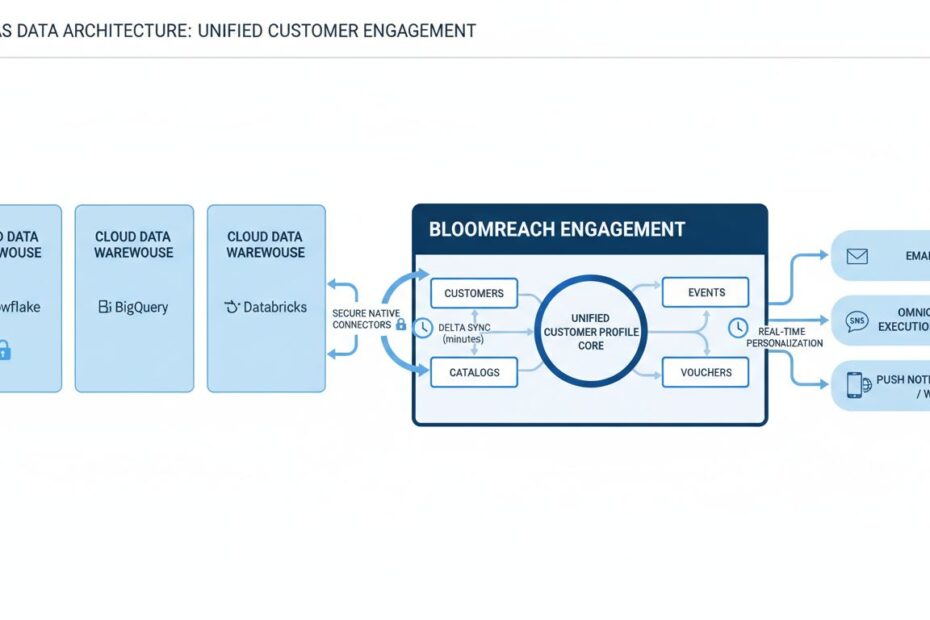
Connecting Bloomreach Engagement directly to your data warehouse solves this problem. You gain a unified, real-time view of every customer across all your data sources. Automated delta syncs keep customer profiles, product catalogs, and behavioral events constantly synchronized, enabling real-time omnichannel campaigns driven by your warehouse data.
This guide walks you through the complete technical process: choosing the right warehouse connection architecture, configuring secure native connectors, mapping your data schema, and scheduling automated incremental syncs that fuel advanced personalization without manual intervention.
Why Real-Time Warehouse Syncing Transforms CRM Outcomes
Legacy email platforms require manual data exports and uploads. You export a CSV file every week, upload it to your email tool, and hope the data is still accurate. By the time campaigns execute, customer behavior has changed.
Real-time syncing eliminates this friction entirely. Your warehouse data flows continuously into Bloomreach, ensuring campaigns always respond to the most current customer state.
Precision behavioral segmentation becomes possible. Instead of “customers who purchased in the last 30 days,” you can segment based on real-time warehouse calculations: “customers with high churn risk according to our ML model” or “customers whose predicted CLV exceeds $500.”
Margin-optimized campaigns are automatically triggered. When your warehouse flags that a high-value customer is at risk of churn, Bloomreach immediately activates a win-back journey. When inventory levels drop below thresholds, SMS notifications push back-in-stock alerts to customers who previously viewed those products.
Reduced ad fatigue follows naturally. Your warehouse tracks cross-channel frequency caps. Bloomreach respects those caps, preventing customers from receiving duplicate messages across email, SMS, and push.
Customer lifetime value increases measurably. Brands implementing real-time warehouse-powered personalization typically see 20-30% improvements in retention and 15-25% increases in average order value. The combination of precision targeting, optimal timing, and reduced friction drives compounding revenue growth.
Data freshness is not a feature. It is a business requirement. Real-time syncing between your warehouse and Bloomreach is how modern retail and e-commerce brands compete.
The Four Core Data Elements of Bloomreach Engagement
Before connecting your warehouse, you must understand what data Bloomreach expects and how it structures that data internally. The platform operates on four foundational data types.
Customers: Unified Profiles and Identity Resolution
Customers are the core entity in Bloomreach. Each customer record contains a unique identifier (email address, customer ID, phone number), standard attributes (name, location, purchase history), and custom attributes specific to your business (loyalty tier, product preferences, segment membership).
Bloomreach uses hard identifiers (registered email addresses, authenticated customer IDs) and soft identifiers (anonymous tracking cookies, device IDs) to consolidate customer records across channels. When you connect your warehouse, you must map your primary customer identifier (typically a customer ID or email) to Bloomreach’s customer ID field.
Identity resolution happens automatically. When an anonymous shopper (tracked via cookie) later logs in with an email address, Bloomreach merges their browsing history with their authenticated profile, creating a unified view for personalization.
Events: Real-Time Action Streams
Events are timestamped records of customer actions: page views, product searches, cart additions, purchases, email opens, SMS clicks. Events power behavioral segmentation and trigger automated workflows.
Your warehouse likely contains historical event data (purchases, browsing behavior, customer service interactions). When you sync events to Bloomreach, the platform uses them to train recommendation algorithms, calculate recency-frequency-monetary (RFM) scores, and trigger lifecycle campaigns.
Events must include a customer identifier, a timestamp, and an event type. Optional event properties capture additional context (product ID, revenue amount, category, discount applied).
Catalogs: Product Lookups and Variant Management
Catalogs are structured product data: item IDs, titles, descriptions, prices, categories, images, inventory levels, and custom attributes. Bloomreach uses catalog data to power product recommendations, dynamic content blocks, and back-in-stock notifications.
Your warehouse typically maintains a master product table with variant-level information (size, color, SKU). When you sync catalogs to Bloomreach, the platform indexes this data and makes it available for personalization.
Catalog syncs should run frequently (ideally every 15 minutes) to ensure inventory levels, pricing, and product metadata stay current.
Vouchers: Campaign-Specific Discount Pools
Vouchers are discount codes, promotional offers, and campaign-specific redemption pools. You define voucher templates in Bloomreach, and the platform manages inventory, redemption tracking, and expiration.
For advanced use cases, you can manage voucher pools in your warehouse and sync them to Bloomreach. This enables dynamic discount strategies: high-value customers receive different voucher codes than price-sensitive segments.
Voucher syncs are less time-sensitive than customer or event syncs, but maintaining accurate inventory in Bloomreach is critical to prevent over-redemption.
Supported Cloud Warehouses and Ingestion Pathways
Bloomreach supports multiple cloud data warehouse platforms, each with distinct technical architectures and optimization profiles.
Native Snowflake Integration: Direct SQL Connectors and Delta Syncs
Snowflake is the most commonly used data warehouse for retail and e-commerce brands. Bloomreach’s native Snowflake integration uses direct SQL connectors (not JDBC or ODBC) to read tables, views, and custom queries.
Key advantages:
- 15-minute delta syncs: Enable change tracking on Snowflake tables, and Bloomreach automatically imports only new or modified records every 15 minutes
- No middleware required: Direct HTTPS connection from Bloomreach to Snowflake SQL Warehouse
- Flexible source types: Import from tables, views, or user-defined queries
- Simple authentication: Username and key pair authentication configured directly in Bloomreach UI
Setup time is typically 30-60 minutes for initial configuration, plus 2-4 hours for schema mapping and testing.
Engagement BigQuery (EBQ): Managed Analytics Warehouse
Google BigQuery is ideal if your analytics team already uses Google Cloud. Bloomreach offers Engagement BigQuery (EBQ), a fully managed data warehouse instance that syncs all Bloomreach data (customers, events, catalogs, campaigns, journey performance) automatically.
Key advantages:
- Zero configuration: BigQuery instance is pre-populated with Bloomreach data schema
- Heavy analytics capability: Run complex SQL queries across historical campaign data without impacting Bloomreach performance
- Native Google Cloud integration: Seamlessly connect to other Google Cloud tools (Looker, Dataflow, Vertex AI)
- Real-time dashboards: Build custom reporting dashboards using BigQuery data
EBQ is ideal for brands with advanced analytics requirements. Setup is handled by Bloomreach; your team simply receives BigQuery access credentials.
Databricks SQL Warehouse: Lakehouse Architecture
Databricks combines data lake and data warehouse capabilities. Bloomreach connects to Databricks SQL Warehouse using native Databricks SQL connectors over HTTPS (not JDBC or ODBC).
Key advantages:
- Lakehouse flexibility: Store structured data (tables) and unstructured data (logs, images) in the same platform
- 15-minute delta syncs: Automatic incremental imports with change tracking enabled
- OAuth M2M authentication: Service principal-based authentication for enterprise security
- Lower cost for large datasets: Databricks pricing is competitive for massive data volumes
Databricks is ideal for brands with complex data pipelines or AI/ML workloads alongside marketing operations.
Step-by-Step Guide to Connecting Bloomreach to Your Data Warehouse
Step 1: Prepare Your Source Data and Warehouse Privileges
Before initiating any connection, your warehouse must be properly configured with the correct user roles, access keys, and read permissions.
For Snowflake:
Create a dedicated Snowflake user account with account admin privileges (required only for initial setup). This user will create the integration connection.
Enable change tracking on all tables you plan to sync:
Add an updated_timestamp column to your customer table. Update this timestamp to the current time every time customer attributes change:
Test connectivity from Bloomreach’s IP range to your Snowflake SQL Warehouse endpoint. Ensure firewall rules allow outbound HTTPS traffic.
For Databricks:
Create a Databricks service principal (machine-to-machine authentication). This principal will be used by Bloomreach to authenticate:
Grant the service principal read-only access to the specific catalog, schema, and tables:
Retrieve the service principal’s Client ID and Client Secret. Store these securely; you will need them in the next step.
For BigQuery:
BigQuery requires less manual setup. You simply need a Google Cloud project with BigQuery enabled and a service account with BigQuery Data Editor permissions. Bloomreach will handle the rest.
Step 2: Activate the Native Connector Module in Bloomreach
Log in to your Bloomreach Engagement workspace. Navigate to Data & Assets > Integrations.
Click Add Integration and select your warehouse type: Snowflake, Databricks, or BigQuery.
For Snowflake:
Enter your Snowflake account identifier (e.g., xy12345.us-east-1.snowflakecomputing.com), username, and private key. Bloomreach validates the connection immediately.
Click Test Connection. If successful, you will see “Connection verified.” If the test fails, verify that:
- Your Snowflake account identifier is correct
- Your username has account admin privileges
- Your private key is properly formatted (PEM format, no extra whitespace)
- Firewall rules allow HTTPS traffic from Bloomreach to your Snowflake endpoint
For Databricks:
Enter your Databricks workspace URL (e.g., https://adb-1234567890.cloud.databricks.com), the HTTP path to your SQL Warehouse (e.g., /sql/1.0/warehouses/abc123def456), and the service principal’s Client ID and Client Secret.
Bloomreach validates the connection by attempting to list tables in your specified schema. If validation fails, verify:
- Your workspace URL and HTTP path are correct
- Your service principal has read access to the specified catalog and schema
- The service principal’s Client Secret is correct and not expired
For BigQuery:
Upload your Google Cloud service account JSON key file. Bloomreach validates access to your BigQuery project.
Once the connection is verified, Bloomreach displays a list of available tables and schemas. Select the schema(s) containing your customer, event, and catalog data.
Step 3: Configure Schema Mapping and Field Alignment
The most critical step is mapping your warehouse columns to Bloomreach’s expected data structure. Misaligned mappings cause data loss or failed imports.
Create a mapping spreadsheet with three columns:
- Warehouse Table Name: The source table in your warehouse (e.g.,
CUSTOMER_DATA) - Warehouse Column Name: The source column (e.g.,
CUSTOMER_ID) - Bloomreach Field: The destination field in Bloomreach (e.g.,
customer_id)
Customer data mapping example:
| Warehouse Table | Warehouse Column | Bloomreach Field | Data Type | Notes |
|---|---|---|---|---|
| CUSTOMER_DATA | CUSTOMER_ID | customer_id | string | Primary identifier |
| CUSTOMER_DATA | string | Required for email campaigns | ||
| CUSTOMER_DATA | FIRST_NAME | first_name | string | Optional |
| CUSTOMER_DATA | LAST_NAME | last_name | string | Optional |
| CUSTOMER_DATA | PHONE | phone | string | Required for SMS campaigns |
| CUSTOMER_DATA | CREATED_DATE | created_date | timestamp | Account creation date |
| CUSTOMER_DATA | LIFETIME_VALUE | lifetime_value | number | Total customer spending |
| CUSTOMER_DATA | SEGMENT | segment | string | Current segment assignment |
| CUSTOMER_DATA | LOYALTY_TIER | loyalty_tier | string | VIP, Gold, Silver, Bronze |
| CUSTOMER_DATA | LAST_PURCHASE_DATE | last_purchase_date | timestamp | Recency indicator |
| CUSTOMER_DATA | PRODUCT_AFFINITY | product_affinity | list | Categories purchased from |
| CUSTOMER_DATA | UPDATED_TIMESTAMP | updated_timestamp | timestamp | Last attribute update |
In Bloomreach’s integration UI, use the Map Fields tab to configure these mappings. For each warehouse column, select the corresponding Bloomreach field from the dropdown.
Event data mapping example:
| Warehouse Table | Warehouse Column | Bloomreach Field | Data Type | Notes |
|---|---|---|---|---|
| EVENTS | CUSTOMER_ID | customer_id | string | Must match customer table |
| EVENTS | EVENT_TIMESTAMP | timestamp | timestamp | When event occurred |
| EVENTS | EVENT_TYPE | event | string | purchase, view, click, etc. |
| EVENTS | PRODUCT_ID | product_id | string | For product recommendations |
| EVENTS | REVENUE | revenue | number | Purchase amount |
| EVENTS | CATEGORY | category | string | Product category |
| EVENTS | DISCOUNT_APPLIED | discount | number | Discount amount or percentage |
Catalog data mapping example:
| Warehouse Table | Warehouse Column | Bloomreach Field | Data Type | Notes |
|---|---|---|---|---|
| PRODUCTS | PRODUCT_ID | item_id | string | Primary identifier |
| PRODUCTS | PRODUCT_NAME | title | string | Product display name |
| PRODUCTS | DESCRIPTION | description | string | Long-form product description |
| PRODUCTS | PRICE | price | number | Current selling price |
| PRODUCTS | CATEGORY | category | string | Product category |
| PRODUCTS | IMAGE_URL | image_url | string | Product image URL |
| PRODUCTS | INVENTORY_COUNT | inventory | number | Current stock level |
| PRODUCTS | UPDATED_TIMESTAMP | updated_timestamp | timestamp | Last catalog update |
Bloomreach validates all mappings before import. If a required field is missing, the import will fail with a specific error message. Address all validation errors before proceeding.
Step 4: Schedule Automated Delta Imports and Synchronization
Once mappings are configured, define your synchronization schedule.
For Snowflake and Databricks:
Select Sync Updates as your import mode. This enables delta imports: only records that have changed since the last import are transferred.
Set your sync frequency:
- Every 15 minutes: Recommended for customer attributes, events, and catalogs. Provides near-real-time data freshness.
- Every 1 hour: Suitable for less time-sensitive data or to reduce warehouse compute costs.
- Every 4 hours: Acceptable for overnight or low-frequency updates.
- Daily: Only for non-critical data that changes infrequently.
Delta syncs work by comparing the updated_timestamp column in your warehouse to Bloomreach’s last import timestamp. Only records with a more recent timestamp are imported.
Cost consideration: Each delta sync runs a SQL query against your warehouse, consuming compute resources (DBUs on Databricks, credits on Snowflake). A 15-minute sync frequency means 96 syncs per day. For a typical customer table with 1 million rows, each sync takes 2-5 seconds and costs $0.01-0.05. Daily cost is typically $1-5 per table. Adjust sync frequency based on your budget and data freshness requirements.
For BigQuery (EBQ):
BigQuery syncs are handled automatically by Bloomreach. You do not configure sync frequency; data is synced continuously as it arrives in Bloomreach.
Step 5: Validate Data Ingestion and Campaign Mapping
Before deploying live campaigns, validate that data has been imported correctly and is accessible for personalization.
Navigate to Data & Assets > Data Manager. Select your imported data source (Snowflake, Databricks, or BigQuery).
Check the Import Status dashboard:
- Total Records Imported: Verify the count matches your warehouse. If significantly lower, investigate missing records.
- Last Sync Timestamp: Confirm the last sync occurred within your expected schedule (e.g., within the last 15 minutes).
- Error Count: Any errors indicate data quality issues or mapping misalignment.
- Data Freshness: Check that
updated_timestampvalues are current.
Click into the Data Preview tab to sample imported records. Verify:
- Customer email addresses are lowercase and properly formatted
- Timestamps are in ISO 8601 format (YYYY-MM-DD HH:MM:SS)
- Numerical fields contain only numbers (no currency symbols or commas)
- List fields (like
product_affinity) are properly formatted as arrays
Navigate to Audiences > Segments to test segment creation using warehouse data.
Create a test segment: “Customers with lifetime value > $500 and last purchase within 30 days.”
Bloomreach should display the segment size (number of matching customers). If the segment is empty or shows unexpected numbers, investigate your data mapping.
Create a test campaign using warehouse-derived attributes for personalization:
- Email subject: “{{first_name}}, here’s your personalized offer”
- Dynamic content: “You’ve spent {{lifetime_value}} with us”
- Recommendation block: “Based on your {{product_affinity}}, you might like…”
Send the test campaign to a sample of 100 customers. Verify that:
- Personalization tokens resolve correctly (no
{{missing_field}}placeholders) - Email content renders properly
- Links and CTAs are functional
Only after successful validation should you enable live campaign execution.
Campaign Activation: Transforming Warehouse Signals into Retail Revenue
Real-time warehouse connections unlock specific, high-impact use cases that drive measurable revenue.
Predictive Churn Prevention and Win-Back Automation
Your warehouse contains a machine learning model that scores every customer’s churn probability. Scores update daily based on recent behavior.
Connect this score to Bloomreach as a customer attribute: churn_risk_score (0-100).
Create a Bloomreach segment: “Customers with churn_risk_score > 75.”
Build an automated journey triggered when a customer enters this segment:
- Hour 0: Send email: “We miss you! Here’s 20% off your next purchase”
- Hour 24: If not opened, send SMS: “Exclusive offer expires in 24 hours”
- Hour 48: If not converted, send push notification: “Final reminder: 20% off ends today”
This journey runs automatically. Every time your warehouse recalculates churn scores and updates Bloomreach, at-risk customers are automatically enrolled in the retention journey.
Expected outcome: 15-25% lift in retention for at-risk customer segments.
Real-Time Inventory-Driven Back-in-Stock Notifications
Your product catalog table in the warehouse includes real-time inventory counts. When a product is out of stock, its inventory_count is 0. When it’s back in stock, the count updates.
Create a Bloomreach segment: “Customers who viewed products in the ‘Winter Coats’ category.”
Build an automated journey triggered by catalog updates:
- When
inventory_countchanges from 0 to > 0 for a Winter Coat product, send SMS: “Back in stock! {{product_name}} is available now. Shop now →”
This journey runs independently for each product variant. Customers who previously viewed a specific coat receive a back-in-stock notification only for that product.
Expected outcome: 10-15% conversion rate on back-in-stock notifications (compared to 2-3% for generic emails).
Propensity-Score-Based Personalization
Your warehouse runs a machine learning model that calculates the propensity for each customer to purchase in specific categories (electronics, apparel, home goods, etc.).
Sync these scores to Bloomreach as custom attributes: electronics_propensity, apparel_propensity, home_propensity.
Create dynamic content blocks in your email templates that change based on propensity scores:
- If
electronics_propensity> 70, show electronics recommendations - If
apparel_propensity> 70, show apparel recommendations - If
home_propensity> 70, show home goods recommendations
Every customer receives a personalized email with product recommendations matched to their predicted interests.
Expected outcome: 20-30% increase in email click-through rate and 15-20% increase in conversion rate.
Margin-Optimized Discount Allocation
Your warehouse calculates the optimal discount for each customer segment based on price elasticity and margin targets.
Sync discount recommendations to Bloomreach as customer attributes: optimal_discount_percentage.
Create a campaign that offers each customer a personalized discount code:
- High-value customers (LTV > $1,000) receive 10% off
- Mid-value customers (LTV $250-$1,000) receive 15% off
- Price-sensitive customers (LTV < $250) receive 20% off
This approach maximizes margin while improving conversion rates across all segments.
Expected outcome: 5-10% improvement in overall margin while maintaining or improving conversion rates.
Common Architectural Mistakes That Cause Data Drift
Mistake 1: Misaligned Data Types Between Warehouse and Bloomreach
Your warehouse stores customer_id as a 64-bit integer: 1234567890. Bloomreach expects a string field. During import, the integer is truncated or converted incorrectly, creating duplicate or missing records.
Fix: Verify data types match exactly. Convert integers to strings in your warehouse before import if Bloomreach expects strings. Test a sample of 100 records to confirm correct conversion.
Mistake 2: Missing or Inconsistent Updated Timestamps
Your customer table lacks an updated_timestamp column. Delta syncs cannot determine which records have changed, so Bloomreach re-imports the entire customer database every 15 minutes.
This causes duplicate records, inflates warehouse costs, and delays other syncs.
Fix: Add an updated_timestamp column to every table. Update this timestamp to the current time whenever any field in the record changes. Verify that timestamps are in ISO 8601 format (YYYY-MM-DD HH:MM:SS).
Mistake 3: Ignoring Consent Category Syncing
Your warehouse tracks customer consent categories (marketing email, SMS, transactional, tracking). You fail to map these to Bloomreach consent fields.
Result: Bloomreach has no consent information for imported customers. All campaigns are suppressed due to missing consent.
Fix: Create a dedicated consent mapping table in your warehouse. Sync this table to Bloomreach every 15 minutes. Verify that 100% of imported customers have a consent status assigned.
Mistake 4: Poorly Scheduled Sync Cadences
You set customer syncs to run every 15 minutes but event syncs to run daily. Customer attributes update in real-time, but events lag by 24 hours.
Result: Campaigns respond to current customer attributes but use stale behavioral data. Personalization is inconsistent.
Fix: Align sync cadences across all data types. If customer attributes sync every 15 minutes, events and catalogs should also sync every 15 minutes. Consistency prevents data fragmentation.
Mistake 5: Unvalidated Schema Mappings
You map warehouse columns to Bloomreach fields without testing. Email addresses are mapped to a text field instead of the email field. Phone numbers lack formatting validation.
Result: Campaigns fail silently. Emails are not sent. SMS numbers are invalid.
Fix: Before enabling live campaigns, create a test segment and send a test campaign to 100 customers. Verify that all personalization tokens resolve correctly. Check that emails are deliverable and SMS numbers are valid.
Mistake 6: Failing to Monitor Data Quality Post-Import
You enable syncs and assume data is correct. No one monitors import logs or validates data freshness.
Result: Syncs fail silently. Data becomes stale. Campaigns execute against outdated information. No one notices for days.
Fix: Set up monitoring alerts:
- Alert if sync duration exceeds 2x the baseline (indicates performance degradation)
- Alert if error count exceeds 0 (indicates data quality issues)
- Alert if last sync timestamp is older than your expected cadence (indicates sync failure)
- Weekly: Spot-check 100 random customer records to verify data accuracy
How Voxwise Simplifies Your Enterprise Data Integration Roadmap
Connecting a data warehouse to Bloomreach Engagement requires technical expertise across multiple domains: cloud data platforms, SQL, data architecture, CRM systems, and marketing automation. Many organizations attempt this integration alone and encounter preventable setbacks: schema misalignment, failed syncs, consent mapping errors, and revenue disruption.
Voxwise specializes in de-risking enterprise data integrations.
We help retail and e-commerce brands:
- Design your target data architecture: Map your warehouse schema to Bloomreach’s data model. Identify required fields, optional attributes, and custom extensions.
- Configure secure connections: Set up warehouse credentials, firewall rules, and authentication protocols. Validate connectivity before any data transfer.
- Execute schema mapping: Create detailed field mappings with data type validation. Test mappings on sample data before full import.
- Implement automated syncs: Configure delta imports at optimal frequencies. Monitor sync health and troubleshoot failures.
- Validate data quality: Run comprehensive data quality checks post-import. Identify and resolve data issues before campaigns launch.
- Activate warehouse-powered campaigns: Build lifecycle workflows, segments, and personalization rules that leverage warehouse data. Optimize performance based on real results.
- Establish ongoing monitoring: Set up alerts for sync failures, data quality degradation, and performance issues.
A successful warehouse integration transforms your marketing technology from a siloed email tool into a unified, real-time customer engagement platform. Bloomreach’s native warehouse connectors, combined with proper data architecture and ongoing optimization, unlock retention growth and revenue increases that legacy email platforms cannot deliver.
Voxwise bridges the gap between your data infrastructure and Bloomreach’s full potential.
Key Takeaways
Connecting Bloomreach Engagement to your data warehouse eliminates data silos and enables real-time, warehouse-powered personalization. Native connectors to Snowflake, Databricks, and BigQuery support automated delta syncs as frequent as every 15 minutes.
The four core data elements (Customers, Events, Catalogs, Vouchers) must be properly mapped from your warehouse schema to Bloomreach’s expected data structure. Misaligned mappings cause import failures and silent campaign errors.
Choose the right warehouse connection based on your cloud platform and analytics needs. Snowflake and Databricks support 15-minute delta syncs with direct SQL connectors. BigQuery EBQ offers managed analytics with pre-built schema.
Prepare your warehouse before initiating any connection. Enable change tracking, add updated_timestamp columns, create dedicated service accounts, and verify connectivity.
Configure schema mappings carefully. Test mappings on sample data before full import. Validate that all required fields are present and data types align.
Schedule delta syncs at appropriate frequencies (typically 15 minutes). Monitor sync health, error rates, and data freshness continuously.
Validate data post-import. Create test segments and campaigns. Verify that personalization tokens resolve correctly and email/SMS delivery works as expected.
Activate warehouse-powered use cases: churn prediction, back-in-stock notifications, propensity-based personalization, margin-optimized discounts. These use cases drive measurable revenue increases.
Monitor continuously. Set up alerts for sync failures, data quality issues, and performance degradation. Weekly spot-checks ensure data accuracy over time.
A well-executed warehouse integration unlocks real-time, AI-powered customer engagement at scale. The investment in proper data architecture and ongoing optimization pays dividends through higher retention, increased customer lifetime value, and accelerated revenue growth.
Frequently Asked Questions
What is the maximum data sync frequency supported between Snowflake and Bloomreach Engagement?
Bloomreach supports delta syncs as frequent as every 15 minutes. This means your warehouse data is imported and available for campaigns within 15 minutes of any change. More frequent syncs are not supported by the platform. If you require sub-15-minute data freshness, consider using Bloomreach’s Kafka integration for real-time event streaming instead of scheduled imports.
Does connecting Bloomreach to our Databricks SQL warehouse require custom JDBC or ODBC drivers?
No. Bloomreach uses a native Databricks SQL connector that connects over HTTPS directly to your Databricks SQL Warehouse endpoint. No JDBC, ODBC, or middleware is required. Authentication is handled via OAuth machine-to-machine (M2M) using a Databricks service principal. This approach is more secure and requires less configuration than traditional database connectors.
How does the platform handle identity resolution when merging data warehouse updates with real-time storefront web events?
Bloomreach maintains a unified customer profile by matching hard IDs (email addresses, customer IDs) from your warehouse with soft IDs (cookies, device IDs) from real-time web tracking. When a customer logs in with an email address that matches a warehouse customer record, their browsing history and warehouse attributes are automatically merged. This happens in real-time without requiring any manual intervention.
Will running frequent delta syncs drastically increase our cloud data warehouse processing costs?
Delta syncs are relatively inexpensive. A typical delta sync of a 1 million-row customer table takes 2-5 seconds and costs $0.01-0.05 on Snowflake or Databricks. Running 96 syncs per day (every 15 minutes) costs approximately $1-5 per table per day. For a typical retail brand with 3-5 core tables (customers, events, products, orders), total daily cost is $10-30. This is negligible compared to the revenue impact of real-time personalization. If costs are a concern, you can adjust sync frequency to hourly (24 syncs per day) or 4-hourly (6 syncs per day).
Can we pass machine-learning-calculated propensity scores directly into Bloomreach customer attributes?
Yes. If your warehouse contains ML-calculated attributes (churn scores, propensity scores, CLV predictions), sync them to Bloomreach as custom customer attributes. Map the warehouse columns containing these scores to Bloomreach custom fields. Once synced, use these attributes in segments, dynamic content, and personalization rules. Scores are updated via delta syncs on your configured schedule (typically every 15 minutes).
What happens to our automated campaigns if the data warehouse connection experiences a temporary network timeout?
If a sync fails due to a temporary network issue, Bloomreach retries the sync automatically. If the retry succeeds, campaigns continue normally. If the retry fails, Bloomreach uses the most recent successfully imported data. Campaigns continue to execute using this data. You should monitor sync logs and set up alerts to detect persistent connection failures. Transient timeouts (< 1 hour) typically do not impact campaign execution.
Should personally identifiable information (PII) data fields be scrubbed before executing a catalog sync?
No. Catalog syncs should contain only product data (item ID, title, price, category, image URL, inventory), not customer PII. If your warehouse includes customer-specific attributes in your catalog table (e.g., customer purchase history), separate these into a customer attributes table before syncing. Bloomreach’s catalog feature is designed for product metadata, not customer data. Mixing PII into catalog data violates data governance best practices and can cause unexpected behavior.
Can we import historical behavioral data spanning multiple years?
Yes, but we recommend limiting imports to 12-24 months of recent data. Bloomreach’s recommendation algorithms train on recent behavioral patterns. Data older than 24 months provides minimal value and increases import time and processing costs. If you need historical data for analytics, use Bloomreach’s export feature to populate BigQuery or your own data warehouse for historical analysis.
How do we handle customer records that exist in multiple warehouse tables (e.g., CRM table and e-commerce table)?
Before importing, consolidate customer records into a single customer master table. Use email address or customer ID as the primary key to match records across systems. Merge attributes from both sources into a single row. If conflicts exist (e.g., different phone numbers), establish a priority rule: e-commerce data takes precedence, or most recent data wins. Import only the consolidated customer master table to Bloomreach.
What is the typical implementation timeline for a complete warehouse connection?
A straightforward implementation (single data source, 5-10 tables, no custom transformations) typically takes 2-4 weeks from initial planning to live campaign execution. Timeline includes: 1 week for data audit and schema design, 1 week for warehouse preparation and credential setup, 1 week for Bloomreach configuration and testing, and 1 week for validation and campaign activation. Complex implementations (multiple data sources, heavy transformations, strict compliance requirements) can take 6-12 weeks.
Ready to Connect Your Data Warehouse to Bloomreach Engagement?
Your data warehouse contains the insights needed to drive real-time, personalized customer engagement. The missing piece is a unified activation platform that transforms warehouse data into revenue-driving campaigns.
Let’s unlock the full potential of your warehouse data.