How to Sync Order and Purchase Data with Bloomreach Engagement
Synchronizing order and purchase data with Bloomreach Engagement transforms raw transactional information into a powerful engine for customer lifetime value (CLV) growth, behavioral segmentation, and automated retention campaigns. Without proper data synchronization, your CRM remains disconnected from the actual revenue-generating moments in your customer journey, forcing you to rely on generic, untargeted campaigns that fail to capture the true value of repeat purchase opportunities.

This guide provides a complete roadmap for syncing order and purchase data with Bloomreach Engagement, covering all three integration methods, required data schemas, and the business outcomes that follow.
Why Syncing Order and Purchase Data Matters for E-commerce Growth
Order and purchase data represents the most valuable signal in your customer database. It directly measures customer behavior, purchase frequency, average order value, and product affinity, which are the core building blocks of predictive retention strategies. When order data remains siloed in your e-commerce platform or ERP system without flowing into Bloomreach Engagement, your marketing team operates with incomplete customer profiles. This fragmentation leads to weak campaigns that treat a first-time buyer the same as a loyal repeat customer, miss critical churn signals, and fail to capitalize on product-specific personalization opportunities.
Properly synchronized purchase data enables Bloomreach Engagement to calculate real-time Customer Lifetime Value, identify RFM segments automatically, and trigger intelligent lifecycle journeys based on actual buying behavior. E-commerce brands that activate purchase data in their CDP see measurable improvements in repeat purchase rates, campaign revenue per segment, and overall marketing ROI. The difference between a generic email campaign and a behavior-triggered, purchase-aware campaign can represent a 3x to 5x increase in conversion rates for retention-focused initiatives.
Before You Start: Essential Prerequisites
Before integrating order and purchase data with Bloomreach Engagement, confirm that your technical team has completed the following foundational steps. First, your Bloomreach Engagement project must be initialized with the JavaScript SDK or server-side API integration already in place, as this forms the foundation for all event tracking.
Second, identify your primary customer identifier (email, customer ID, phone number, or a combination) that will link anonymous browsing behavior to post-purchase customer profiles.
Third, map out your current order data structure in your e-commerce platform, ERP, or order management system, including all fields that represent order status, line items, product SKUs, pricing, and timestamps.
Finally, confirm that your data governance and consent management processes are aligned with Bloomreach’s consent categories, as purchase data often includes PII that must be tracked with proper privacy controls.
The Core Data Schema: Anatomy of a Bloomreach Purchase Event
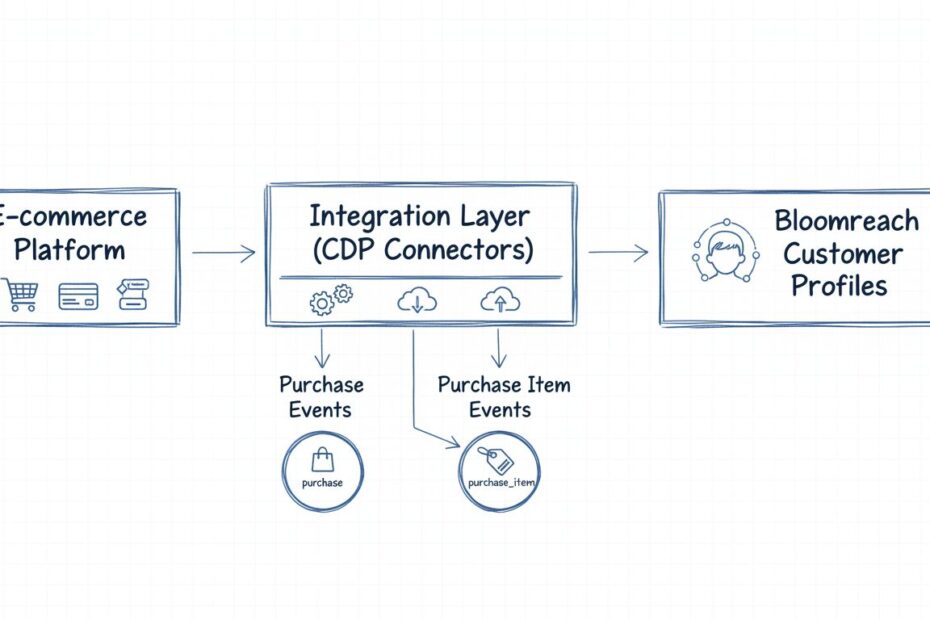
Bloomreach Engagement requires a specific two-event structure for every transaction to ensure complete data capture and enable granular personalization. A single order must fire two distinct event types simultaneously: a parent purchase event that captures the overall transaction details, and individual purchase_item events that track each unique product within that order. This separation is critical because it allows Bloomreach to calculate order-level metrics (total revenue, purchase frequency, refund rates) while simultaneously enabling product-level personalization (cross-sell recommendations, category affinity, SKU-specific retention campaigns).
Required Attributes for the ‘purchase’ Event
The purchase event captures the high-level transaction metadata that powers order analytics and customer segmentation. The timestamp attribute must be recorded in ISO 8601 format (for example, 2026-06-24T14:30:00Z) and represents the exact moment the order was completed, enabling Bloomreach to calculate recency metrics and build time-based customer segments. The purchase_id is the unique transaction identifier (such as ORD-987654) that links the parent purchase event to all associated purchase_item events and prevents duplicate order processing in Bloomreach’s deduplication system.
The purchase_status attribute tracks the transactional outcome, accepting values such as ‘success’ for completed orders or ‘refund’ for canceled transactions. This field is essential for data quality because it allows your retention campaigns to exclude refunded orders from CLV calculations and prevents inflated predictive metrics. The total_price attribute records the final order amount as a number (for example, 129.50) and must include all discounts and taxes applied at checkout. The currency attribute specifies the 3-letter ISO currency code (EUR, USD, GBP) so that Bloomreach can normalize revenue metrics across international transactions.
Required Attributes for the ‘purchase_item’ Event
The purchase_item event must fire once for each distinct product in the order, creating a line-item-level record that unlocks product-specific personalization and cross-sell intelligence. The purchase_id attribute in the purchase_item event must match the parent purchase event’s purchase_id exactly, creating the link that allows Bloomreach to reconstruct the complete order hierarchy. The product_id or SKU identifies the specific product variant (such as “SHIRT-BLUE-M” or “SKU-12345”) and enables product recommendation engines to learn which items are frequently purchased together.
The price attribute in purchase_item records the individual product price as it was charged at checkout, and the quantity attribute tracks how many units of that product were purchased. Together, these attributes enable Bloomreach to build product category segments, identify your highest-value SKUs, and create automated win-back campaigns targeting customers who purchased specific items in the past. Without purchase_item events, your personalization is limited to generic order-level merge tags and you lose the ability to execute sophisticated product-aware retention strategies.
Three Methods to Sync Purchase Data with Bloomreach Engagement
Bloomreach Engagement provides three distinct integration surfaces for order synchronization, each optimized for different technical architectures and data flow patterns. Your choice depends on your e-commerce platform, data residency requirements, and whether you need real-time event capture or batch historical imports.
Method 1: Pre-built E-commerce Connectors (Recommended for Most Brands)
Pre-built connectors represent the fastest path to production for brands using popular e-commerce platforms. Bloomreach Engagement maintains native integrations for Shopify, BigCommerce, commercetools, and other major platforms, eliminating the need for custom API development. These connectors automatically map order events, customer profiles, and product catalog data into Bloomreach’s native schema, reducing implementation time from weeks to days.
To activate a pre-built connector, navigate to Data & Assets > Integrations in your Bloomreach Engagement workspace. Select your e-commerce platform from the available options and follow the in-app setup wizard. The connector will request authentication credentials to your e-commerce platform (API keys, OAuth tokens, or webhook credentials) and automatically begin syncing order data in real-time or on a configured schedule. For Shopify, the connector captures purchase events whenever an order status changes, automatically populating the purchase, purchase_item, product SKU, and customer email attributes.
The primary advantage of pre-built connectors is that they handle deduplication, timestamp normalization, and data validation automatically, reducing the risk of malformed events reaching your Bloomreach database. They also support bi-directional data flow, meaning you can push customer segments or campaign decisions back to your e-commerce platform for operational use.
Method 2: Real-Time Web Tracking via JavaScript SDK
The JavaScript SDK approach captures purchase events directly from your checkout or order confirmation page as transactions complete. This method is ideal for brands with custom-built e-commerce platforms, headless commerce architectures, or multi-channel sales environments where a single connector cannot capture all order sources.
Implement purchase tracking by firing a purchase event followed by a loop that fires individual purchase_item events for each product in the cart. The code structure follows this pattern:
The SDK automatically handles customer identification by matching the current session to known customer profiles using your configured hard IDs (email, customer ID). If the customer is anonymous at checkout, the SDK creates a temporary profile that merges with the customer’s known profile once they log in or complete an email capture. This ensures that post-purchase campaigns can reach customers across all channels.
Server-side tracking via the Bloomreach API is preferred over client-side tracking for mission-critical transaction data because it eliminates the risk of tracking failures due to ad blockers, browser privacy settings, or JavaScript errors. However, client-side tracking is appropriate for brands prioritizing implementation speed or requiring real-time event capture for immediate campaign triggers.
Method 3: API Imports and Batch Syncing for Historical Data
Batch imports are essential for migrating historical order data from legacy systems, third-party CRMs, or data warehouses into Bloomreach Engagement. This method is also appropriate for brands with complex order architectures where multiple systems contribute to a single customer’s purchase history.
To import historical order data, structure your order records as a CSV or JSON file containing one row per order with all required attributes: customer identifier, purchase_id, purchase_status, total_price, currency, and timestamp. Then navigate to Data & Assets > Data manager > Imports and upload your file. Bloomreach’s Data Manager automatically validates the schema, maps fields to your project’s event definitions, and processes the import in the background.
For programmatic bulk imports, use the Bloomreach Engagement API’s Batch Commands endpoint or the dedicated Import API. This approach is necessary when you need to sync hundreds of thousands of orders or integrate with an automated data pipeline. The API accepts JSON payloads containing customer records and associated events, processes them asynchronously, and returns a status report indicating successful imports, validation errors, and any records that failed deduplication checks.
| Integration Method | Real-Time | Setup Time | Custom Development | Best For |
|---|---|---|---|---|
| Pre-built Connectors | Yes | 1-2 days | None | Shopify, BigCommerce, commercetools |
| JavaScript SDK | Yes | 2-5 days | Moderate | Custom e-commerce, headless platforms |
| API Batch Imports | No | 1-3 days | Minimal | Historical data, legacy systems, data warehouses |
Activating Purchase Data in CRM and Retention Campaigns
Once order data flows into Bloomreach Engagement, the real value emerges through campaign activation. Raw purchase events must be translated into customer segments, lifecycle journeys, and automated decision logic that drives revenue.
Dynamic Customer Segmentation Based on Purchase Behavior
Bloomreach Engagement enables dynamic segmentation that moves beyond static customer lists to behavior-driven audiences. Create an RFM segment that automatically includes customers who have purchased within the last 90 days (Recency), made 3 or more purchases in the past year (Frequency), and spent more than 500 EUR (Monetary value). This segment updates in real-time as new purchase events arrive, ensuring your high-value customer campaigns always reach the correct audience.
Build a first-time buyer segment that includes customers with exactly one purchase event in their profile. Use this segment to trigger a post-purchase onboarding journey that introduces your brand story, educates customers on product care, and offers a loyalty program enrollment incentive. The same purchase data enables you to create a VIP segment for customers whose cumulative lifetime value exceeds 5000 EUR, triggering exclusive early-access campaigns and personalized service offers.
Automated Lifecycle Journeys Triggered by Purchase Events
Structure your customer lifecycle around purchase milestones. Create a second-purchase conversion journey that triggers 7 days after the first purchase, sending a personalized email recommending complementary products based on the initial purchase SKU. For customers who make a second purchase, transition them into a loyalty acceleration journey that offers exclusive discounts every 30 days based on their historical purchase frequency.
For at-risk customers, build a win-back journey triggered when purchase frequency declines. If a customer who typically purchases every 45 days has not purchased in 90 days, automatically send a re-engagement campaign with a limited-time offer and product recommendations based on their previous purchases. This proactive approach recovers dormant customers before they churn completely.
Churn Prevention Through Purchase Frequency Signals
Use running aggregates in Bloomreach to calculate each customer’s average purchase frequency and days since last purchase. Create a churn risk segment that identifies customers whose purchase frequency has declined by 50 percent compared to their historical average. These customers receive an immediate intervention campaign with a personalized offer designed to restore purchase behavior.
Common Order Syncing Mistakes to Avoid
Understanding the most frequent implementation errors helps you avoid costly data quality issues that undermine campaign performance.
Mistake 1: Omitting purchase_item Events
Many brands sync only the parent purchase event without firing individual purchase_item events for each product. This approach severely limits personalization because Bloomreach cannot determine which specific products were purchased. Your campaigns default to generic recommendations and product-agnostic messaging, missing opportunities for SKU-specific retention and cross-sell campaigns. Always ensure your implementation fires one purchase_item event per distinct product in every order.
Mistake 2: Failing to Resolve Customer Identity Across Touchpoints
If your implementation does not properly link anonymous browsing behavior to post-purchase customer profiles, you create fragmented customer records that prevent Bloomreach from building a single customer view. A customer who browses products anonymously, makes a purchase under their email address, and then receives a campaign from a different profile is a sign of identity resolution failure. Ensure your customer identifier strategy uses a consistent hard ID (email or customer ID) across all tracking surfaces.
Mistake 3: Ignoring Refunds and Order Cancellations
Failing to sync refunded orders or canceled transactions inflates your CLV metrics and skews automated campaign targeting. A customer who purchased a 500 EUR item but returned it should not be treated as a high-value customer in your retention campaigns. Always track the purchase_status attribute and update it when refunds or cancellations occur. Consider implementing a separate refund event that reduces the customer’s lifetime value calculation.
Mistake 4: Using Inconsistent Timestamps or Missing Timestamp Data
Timestamps enable Bloomreach to calculate recency metrics, build time-based segments, and order events chronologically within customer journeys. If timestamps are missing or recorded in inconsistent formats, your analytics become unreliable. Always capture the exact moment the order was completed in ISO 8601 format and ensure your implementation does not use the current server time instead of the actual transaction time.
Mistake 5: Failing to Test with Real Order Data
Before deploying to production, test your purchase event implementation with a real test order. Verify that the purchase and purchase_item events appear in your Bloomreach project’s event log, that customer identification resolves correctly, and that all required attributes are populated. Use Bloomreach’s Data Manager to inspect tracked values and confirm that your implementation matches the expected schema.
Tools and Data You Need
Successful order data synchronization requires the right technical foundation and data sources. At minimum, you need access to your e-commerce platform’s order management system or API, which serves as the source of truth for transaction data. Your technical team must have authentication credentials (API keys, OAuth tokens, or webhook credentials) to connect Bloomreach Engagement to this system.
You also need a clear data mapping document that defines how fields from your e-commerce system map to Bloomreach’s purchase event schema. For example, your e-commerce system might use “order_total” while Bloomreach expects “total_price”. Document these mappings before implementation to avoid data quality issues. If you are importing historical data, you need access to your order database or data warehouse and the ability to export order records in CSV or JSON format.
Finally, ensure you have governance tools in place to track which customer attributes are PII and require consent before processing. Bloomreach’s Privacy Management settings allow you to mark attributes as personally identifiable information, but your implementation must respect consent categories at the point of data collection.
How to Measure Success of Your Unified Data Layer
Measure the success of your purchase data synchronization through these key retail metrics. First, track the repeat purchase rate, which measures the percentage of customers who make more than one purchase. A properly synchronized data layer enables you to segment first-time buyers separately from repeat customers and measure whether your lifecycle campaigns increase repeat purchase behavior.
Second, monitor campaign revenue per segment, comparing revenue generated from campaigns triggered by purchase-aware segments versus generic broadcast campaigns. A segment of customers who purchased in the last 30 days should generate significantly higher revenue per email sent than a segment of all customers.
Third, calculate customer lifetime value accuracy by comparing CLV calculated within Bloomreach against CLV calculated from your e-commerce system. If these numbers diverge significantly, it indicates data quality issues such as missing purchase events, incorrect refund tracking, or identity resolution failures.
Fourth, measure win-back rate, tracking the percentage of dormant customers who re-engage after receiving a re-engagement campaign. This metric demonstrates whether your purchase frequency signals are accurate and whether your churn prevention campaigns are effective.
Finally, track marketing ROI by data quality tier, comparing campaign performance from segments built on complete, synchronized purchase data versus segments built on partial or unvalidated data. This comparison quantifies the business value of proper data synchronization.
How Voxwise Can Help
Voxwise specializes in helping retail and e-commerce brands transform raw data strategies into functional, revenue-generating campaigns. Our team audits your current Bloomreach configuration to identify where order data is missing, incomplete, or incorrectly mapped. We document your existing data flow, identify gaps in identity resolution, and recommend architecture changes that enable advanced personalization.
We design and implement purchase event schemas tailored to your specific product catalog, order structure, and business model. Whether you need help selecting between pre-built connectors, JavaScript SDK implementation, or batch API imports, we provide architecture guidance based on your technical environment and timeline constraints. We also validate your implementation with real order data, test identity resolution across all customer touchpoints, and ensure that your campaigns receive clean, complete purchase signals.
Beyond technical implementation, Voxwise helps you activate purchase data through strategic campaign architecture. We design lifecycle journeys that turn one-time buyers into repeat customers, build RFM segments that power targeted retention campaigns, and establish monitoring dashboards that alert you to data quality issues before they impact campaign performance. Our goal is to ensure that every order flowing into Bloomreach Engagement translates directly into revenue growth.
Conclusion
Synchronizing order and purchase data with Bloomreach Engagement is the foundation of modern e-commerce marketing. The three integration methods (pre-built connectors, JavaScript SDK, and batch API imports) provide flexibility to match your technical architecture, while the two-event structure (purchase and purchase_item) ensures that Bloomreach captures the granular data necessary for behavioral segmentation and product-aware personalization. By avoiding common implementation mistakes, properly mapping your data schema, and activating purchase signals through lifecycle campaigns, you transform your CRM from a generic broadcast channel into an intelligent, behavior-driven growth engine.
The brands winning in competitive e-commerce markets are those that synchronize purchase data immediately and completely, using it to fuel dynamic segmentation, churn prevention, and automated lifecycle journeys. Start by choosing your integration method based on your platform, map your order data to Bloomreach’s schema, and then measure success through repeat purchase rates, campaign revenue per segment, and CLV accuracy.
Frequently Asked Questions
What is the difference between a purchase event and a purchase_item event in Bloomreach?
The purchase event captures the overall order-level data including total price, currency, and purchase status. The purchase_item event records individual products within that order, including product ID, price per unit, and quantity. A single order must fire one purchase event and one purchase_item event for each distinct product.
How does Bloomreach Engagement track product refunds or canceled orders?
Update the purchase_status attribute to ‘refund’ or ‘canceled’ and fire a new purchase event with the updated status. Alternatively, implement a separate refund event that records the refunded amount and reason. This ensures your CLV calculations exclude refunded revenue.
Can I import my historical e-commerce order logs into Bloomreach Engagement?
Yes. Use the Data Manager import feature (Data & Assets > Data manager > Imports) to upload CSV or JSON files containing historical orders. Alternatively, use the Bloomreach Engagement API’s Batch Commands or Import API for programmatic bulk imports of large order datasets.
Is it better to track purchase events client-side or server-side in Bloomreach?
Server-side tracking via the API is preferred for transaction data because it is not affected by ad blockers or browser privacy settings. However, client-side JavaScript SDK tracking is appropriate for brands prioritizing implementation speed and requiring real-time event capture for immediate campaign triggers.
Why is the purchase_id attribute critical for data quality?
The purchase_id links the parent purchase event to all associated purchase_item events. Bloomreach uses this identifier for deduplication, preventing the same order from being imported multiple times. Without unique, consistent purchase_ids, your CLV metrics become inflated.
How do automated purchase syncs improve Customer Lifetime Value calculation?
Real-time purchase syncs ensure that CLV calculations always reflect the customer’s complete purchase history without manual updates. Automated syncs also enable Bloomreach to recalculate CLV whenever refunds occur or new purchase events arrive, keeping your segments and targeting always aligned with current customer value.
What native e-commerce connectors does Bloomreach Engagement support?
Bloomreach provides pre-built connectors for Shopify, BigCommerce, commercetools, and other major platforms. Check the Bloomreach Integrations documentation for the complete list of supported platforms and platform-specific setup guides.
Improve Your Bloomreach Order Data Sync
Is your order data fully synchronized with Bloomreach Engagement? Our team audits your current setup, identifies data quality gaps, and implements the right integration architecture for your business.